BIOS
Page 4-8
4-3 Advanced Chipset Features
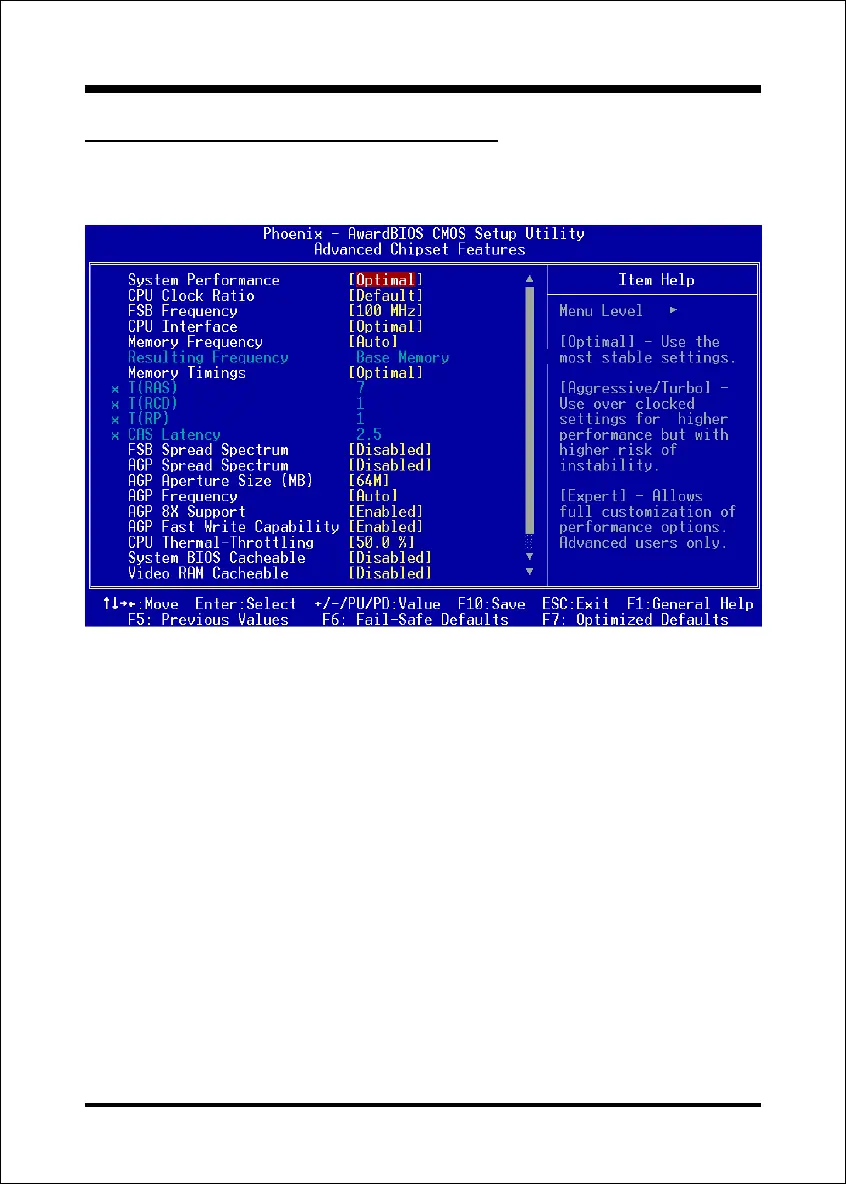
Choose the ADVANCED CHIPSET FEATURES option in the CMOS SETUP
UTILITY menu to display following menu.
Figure 4: Chipset Features Setup
System Performance
This item will help you to configure your system performance.
Options: Optimal, Aggressive, Turbo, Expert.
CPU Clock Ratio
Use this item to select a multiplier for the system frontside bus (FSB) frequency. The
value of the multiplier must be set so that:
Multiplier x Frontside Bus Frequency = CPU Clock Speed
For example, if you have a processor that is rated to run at 450 MHz and the
system is running a frontside bus frequency of 100 MHz, you should select a
multiplier of 4.5 so that:
4.5 (Multiplier) x 100 MHz (frontside bus) = 450 MHz (CPU clock)



 To Next Page