13
3.4 Charging the NAVY Battery
Read the following notes before charging a NAVY Battery:
Only use ePropulsion specified chargers. Do not use any third party
chargers.
Only charge NAVY Battery within temperature range from 0˚C~50˚C
(32˚F~122˚F).
Avoid water contact and direct sun/rain exposure during the charging
process.
Avoid touching the charger while charging as the high temperature met-
al surface may burn your skin.
Do not plug the charger into a power strip to avoid overload.
Do not overcharge the battery.
A. Charging procedures for a single NAVY Battery
1. Turn off both battery switch and main power cable switch.
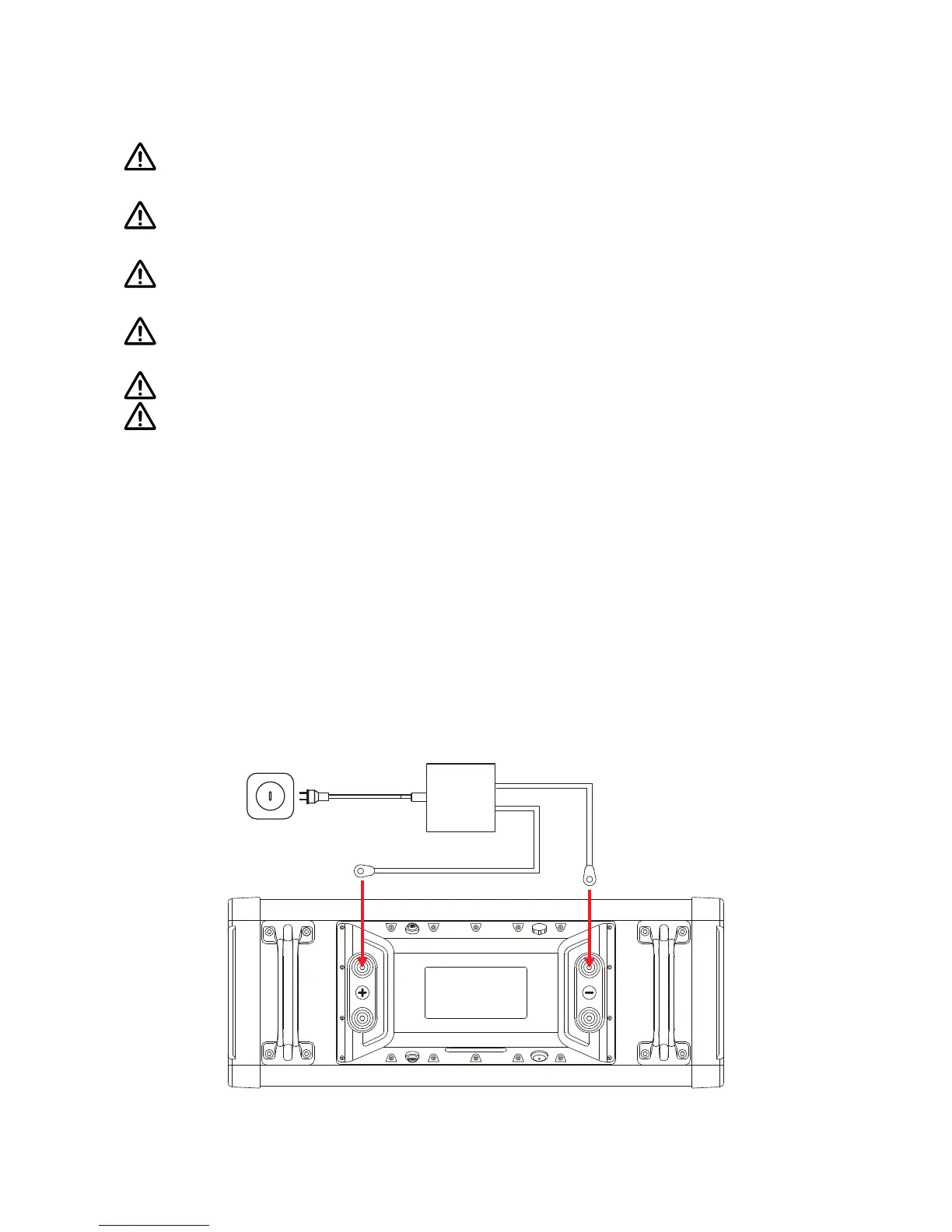
2. Connect the NAVY Battery with its charger, then plug the charger into a
wall socket.
3. Press on/off-switch to turn on the battery. The running indicator (refer to
gure 3-6) illuminates constantly while the battery level indicators will
blink when it starts to charge.
4. When the four battery indicators all illuminate constantly, it indicates the
battery is fully charged. First switch off the charger then the battery.
Disconnect the charger output cable from the battery afterwards.


 To Next Page