2
Viewing Your Electronic Printer Manual
Your printer software CD-ROM includes an electronic Reference Guide for your
printer. The manual is in HTML format, so you need a browser—such as Microsoft
®
Internet Explorer 3.0 or later or Netscape Navigator
®
3.0 or later—to view it. If you
are using a different browser, the pages may not display correctly.
A browser is not included on the printer software CD-ROM.
You can view your electronic Reference Guide from the CD-ROM or copy it to your
hard drive and view it from there. Follow these steps:
1. Insert your printer software CD-ROM.
2. Windows: Double-click
My Computer
, double-click your CD-ROM
drive icon, then double-click the
EPSON
icon.
Macintosh: Double-click the
EPSON
CD-ROM icon, then double-click the
EPSON
icon.
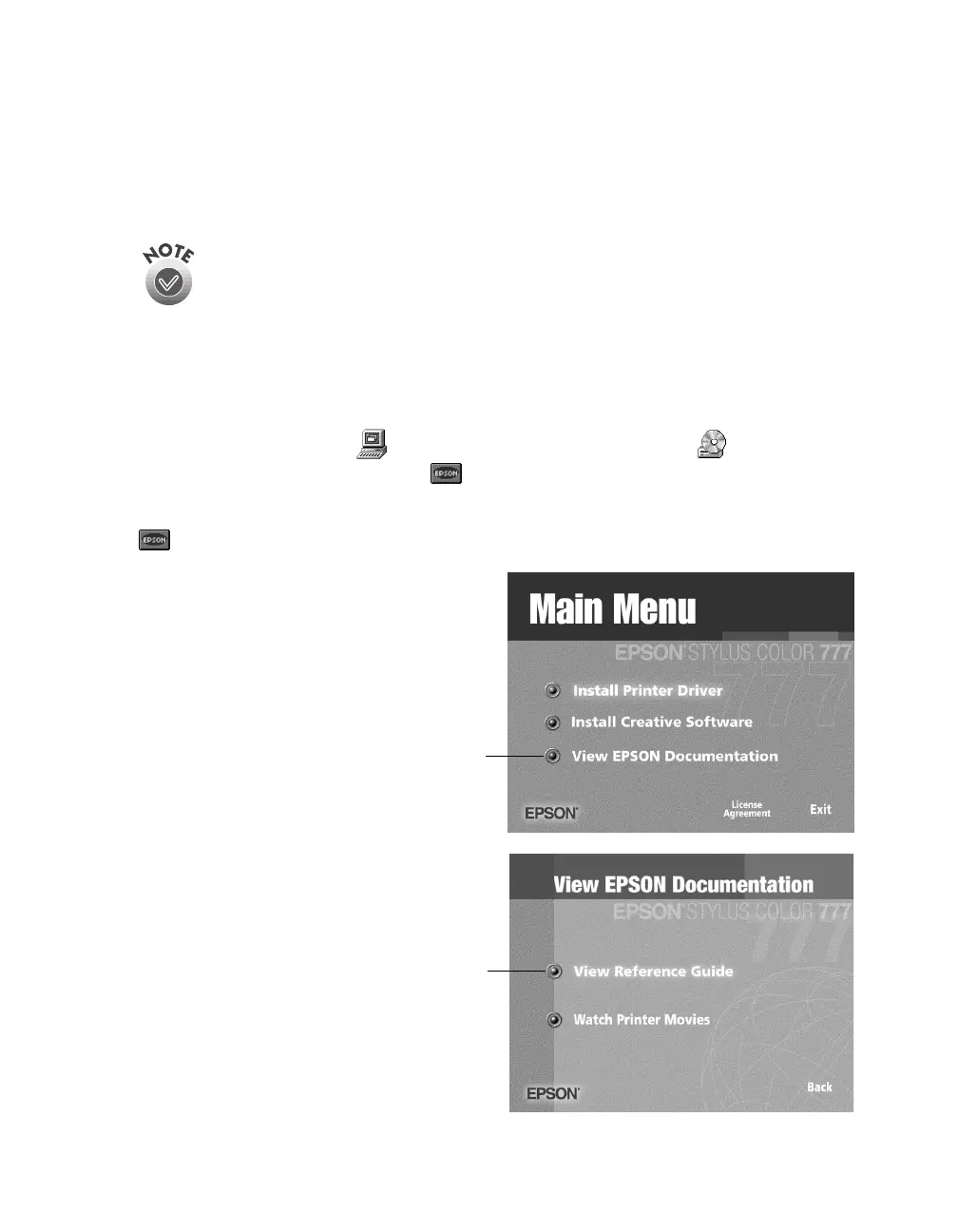
The Main Menu appears:
3. Click
View EPSON
Documentation
. A submenu
appears:
4. Click
View Reference
Guide
. You see another
submenu. You can view the
manual from the CD-ROM
or copy the manual to your
hard drive and view it from
there. For details on viewing
it, see the next section.
Click here
Click here









 To Next Page