Connecting Image Sources
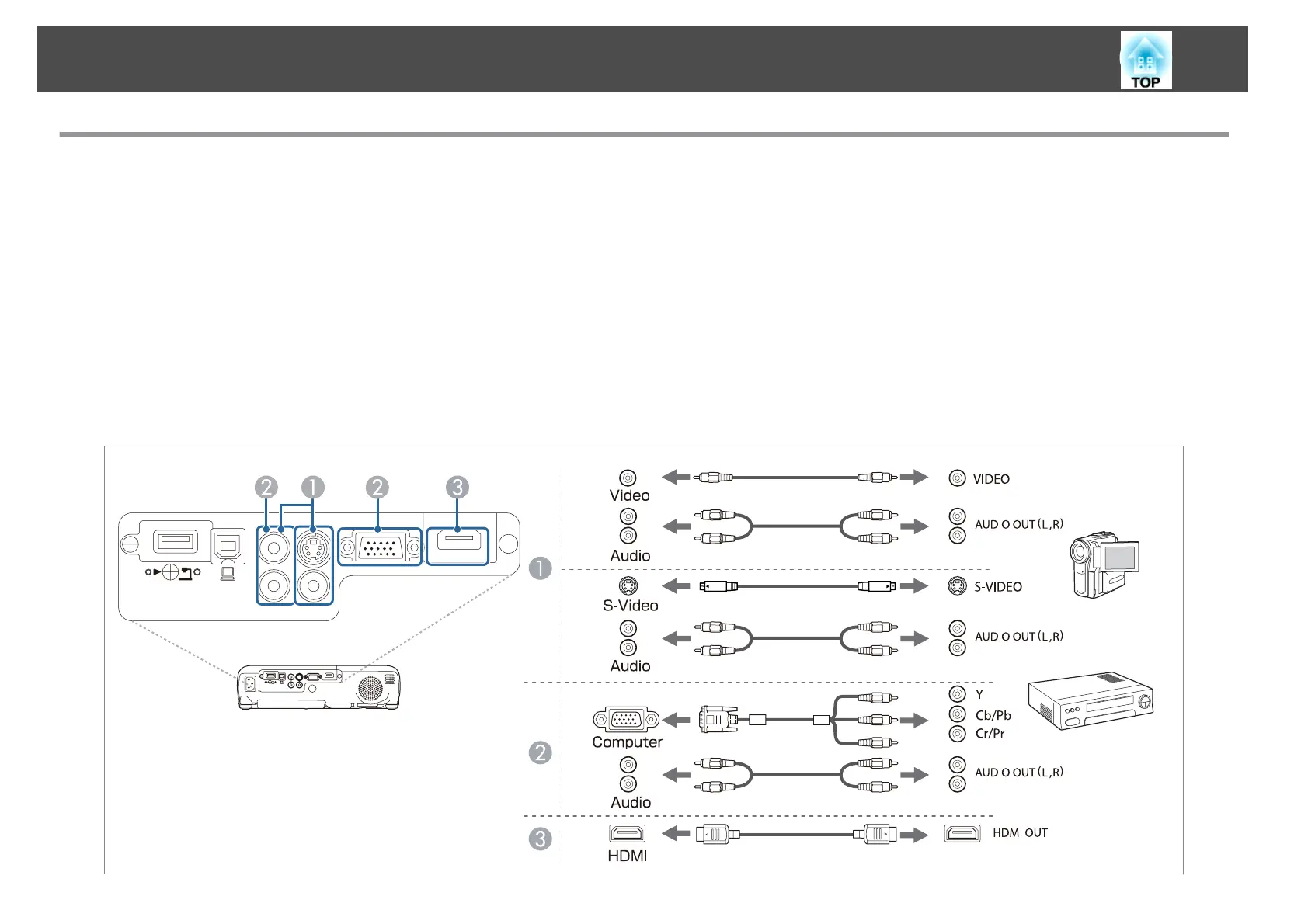
To project images from DVD players or VHS video and so on, connect to the projector using one of the following methods.
A
When using a commercially available video or S-video cable
Connect the video output port on the image source to the projector's Video port. Or, connect the S-video output port on the image source to the projector's S-Video port. You can
output audio from the projector's speaker by connecting the audio output port on the image source to the projector's Audio port using a commercially available audio cable.
B
When using the optional component video cable
s "Optional Accessories" p.115
Connect the component output port on the image source to the projector's Computer input port. You can output audio from the projector's speaker by connecting the audio output
port on the image source to the projector's Audio port using a commercially available audio cable.
C
When using a commercially available HDMI cable
Connect the HDMI port on the image source to the projector's HDMI port. You can send the image source's audio with the projected image.
Connecting Equipment
24


 To Next Page