17
Displaying an Image of Printed Documents and Other
Materials
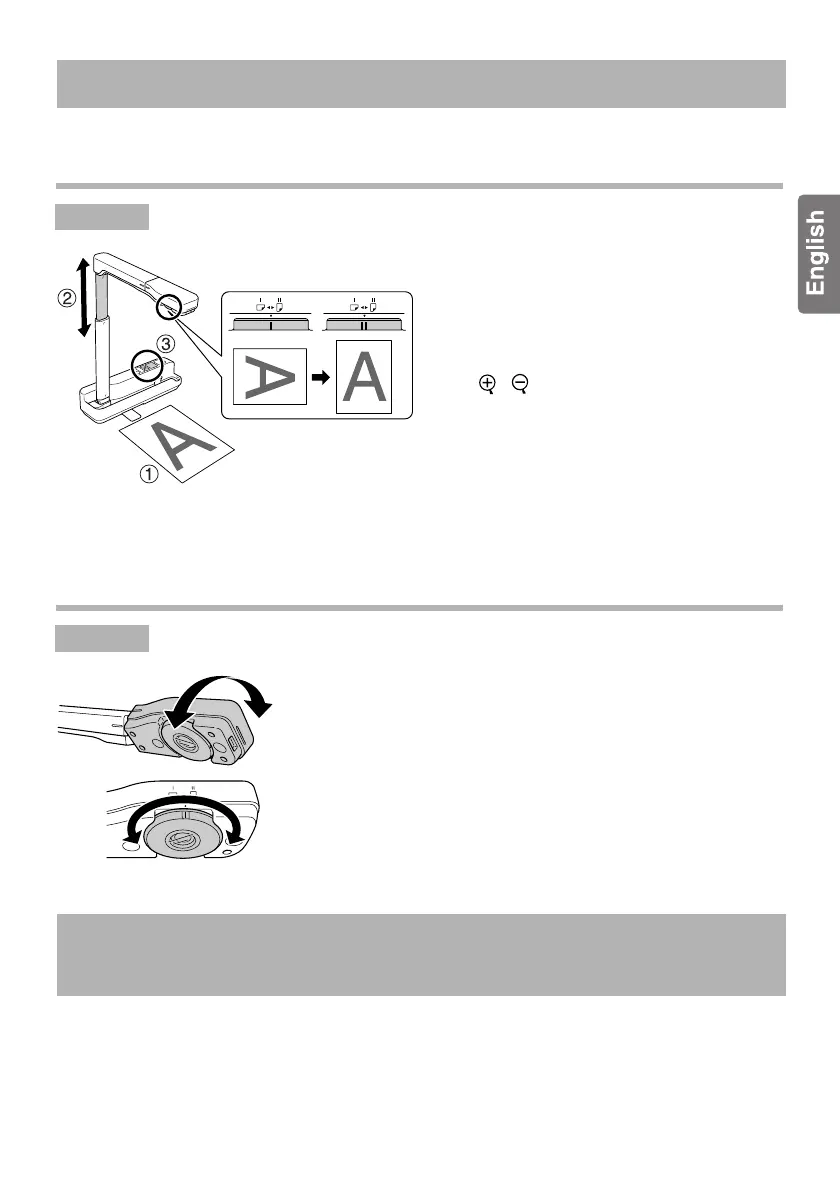
A Place the document you want to
display directly under the camera
lens.
B Extend or retract the camera arm to
adjust the image size and press the
[ ][ ] buttons to enlarge or reduce
the image size.
C Press the [Focus] button to
automatically focus the image.
If you want to rotate the image, turn the
image rotation dial.
Displaying an Image from a Whiteboard
A Turn the camera head to display an image from a
whiteboard or wall.
B If you want to rotate the image, turn the image
rotation dial.
To connect the unit to a computer, you must install the included "ArcSoft Application
software for ELPDC06" onto the computer. When the software is installed onto a computer,
the computer can be used to operate the unit and capture images.
See the Quick Start Guide supplied with the unit for more details.
Displaying Images
Procedur
Procedur
Connecting to a Computer to Display
Images













 To Next Page