20
Compatible File Formats
Editing Saved Images
A Start the ArcSoft Application software for ELPDC06.
Click "Start" - "Programs" (or "All Programs") - ArcSoft Application software for
ELPDC06.
B The start screen appears. Click "Edit" .
C The editing screen appears and the saved images are displayed.
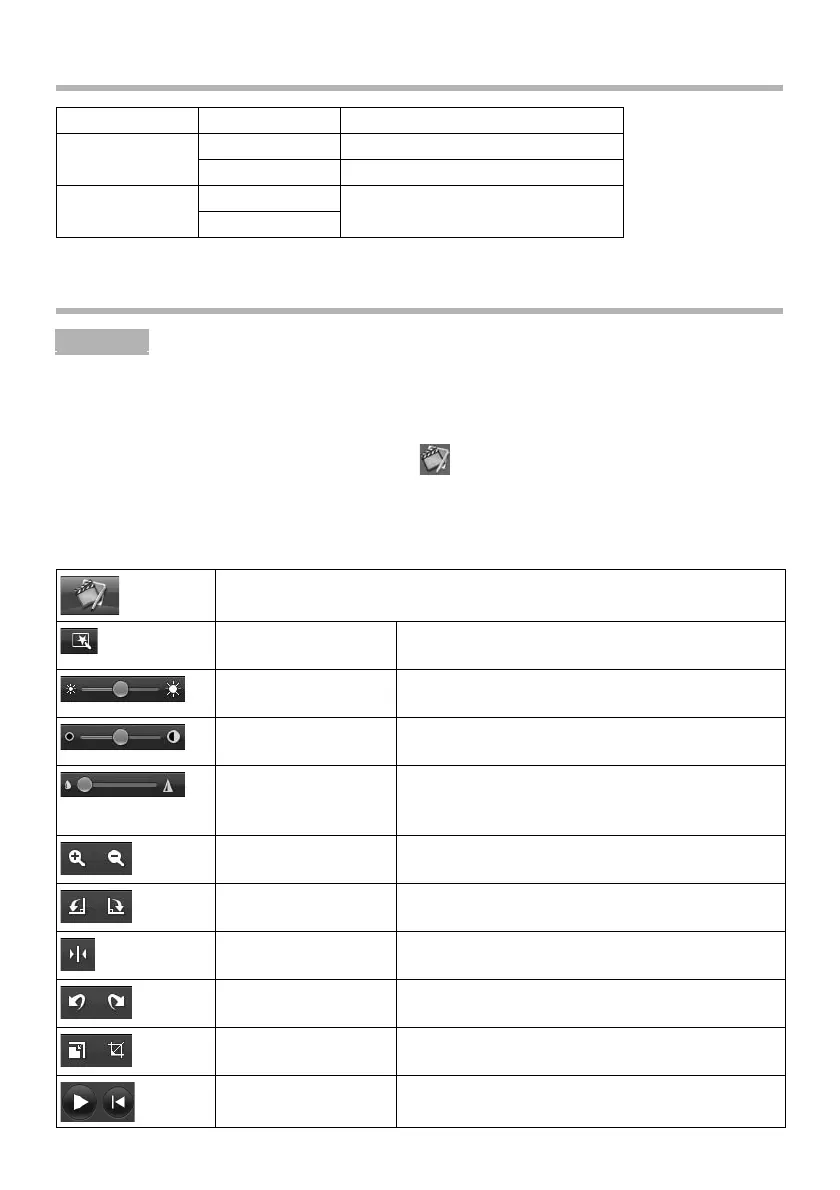
■ Using the editing screen
Type Extension Remarks
Still images .jpg
.bmp
Moving images .wmv Maximum 640 × 480 pixels
.mpg
Procedur
Switches to the capture screen.
Automatic adjustment Automatically adjusts the brightness, contrast,
and outline.
Brightness Adjusts the brightness of the image.
Contrast Increases and decreases the contrast of
characters and lines.
Outline adjustment Makes the outline of the image clearer.
This function is not displayed for moving
images.
Enlarge/reduce Enlarges and reduces the image.
Rotation Rotates the image.
Reverse Reverses the image left to right.
Undo/redo Returns to the previous operation.
Resize Adjusts the image size.
Play/pause Plays and pauses the recorded moving image.













 To Next Page