25
English
Enlarge Reduce
Normal
Wide Top
Wide Base
Extend Retract
Rear Adjustable
Foot
● Adjusting Position and Focus ●
(Setting up for the first time or after moving)
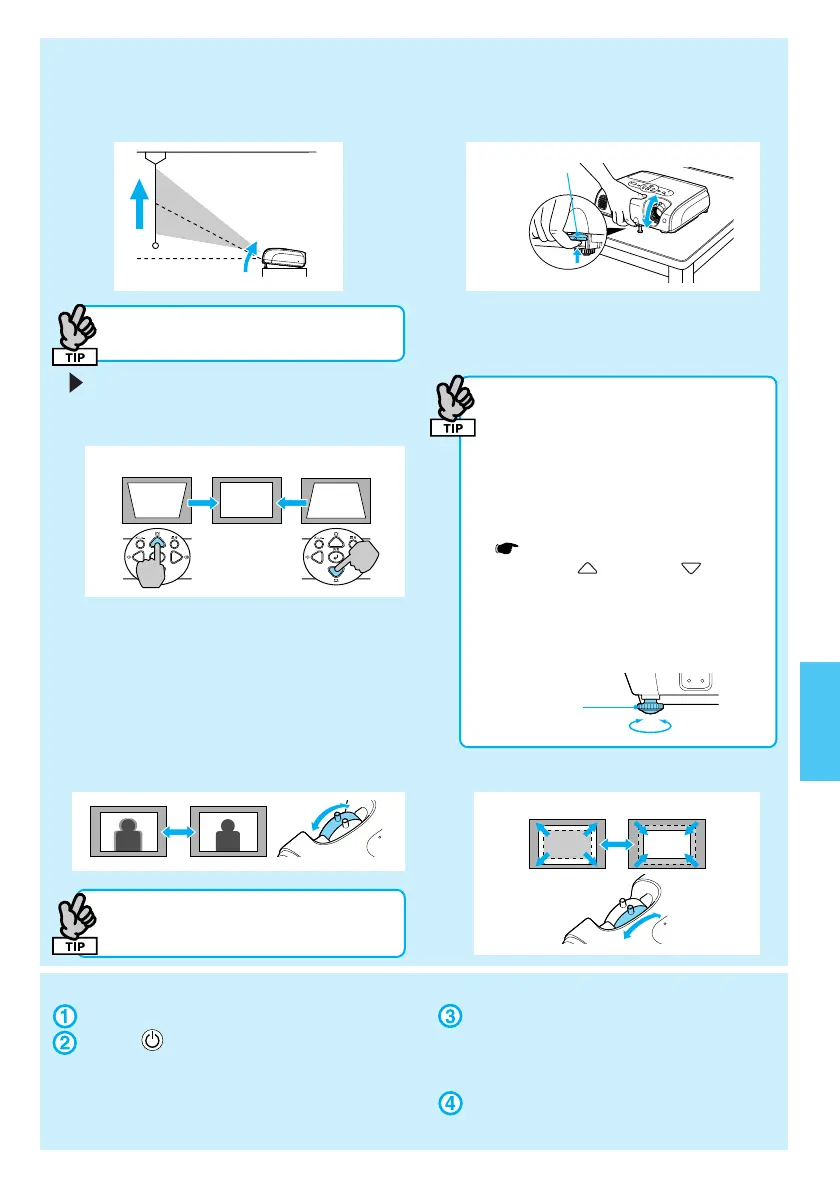
■ Raising the Projection Position (Adjusting the front foot)
When moving the projector, make
sure the front foot is retracted.
You can adjust the front foot to raise the
projection angle up to a maximum of 10°.
Correcting Keystone Distortion
You can adjust the vertical tilt to a maximum
of about 30°*.
*The greater the angle of tilt, the harder the
image is to focus. Setup the projector at a
lower angle of tilt.
• When the "Auto Keystone" function
is turned "Off" in the configuration
menu, automatic keystone
correction is not performed.
(EMP-82/62 only)
• You can also make keystone
corrections from the configuration
menu.
User’s Guide "Settings Menu"
• Hold down
and press for
more than one second to reset the
correction value to the default
setting.
• Adjust the horizontal tilt by turning
the left rear foot.
■ Adjusting Focus
After keystone correction and
sharpness adjustments, the image
may be unfocused.
■ Adjusting Projection Size
● Turning the Projector off ●
Turn off all connected equipment.
Press twice on the remote
control or control panel.
After the confirmation buzzer beeps
twice, unplug the power cable.
Electricity is consumed if only the
projector's power is turned off.
Attach the lens cover.
* If you turn the power on straight after turning it off, the time before projection starts becomes longer than usual.
FootAdjust
Lever



 To Next Page