2018/2/26
Revision: 1 Page: 16
2.3.2 Printing Area (Zero margin/ Borderless)
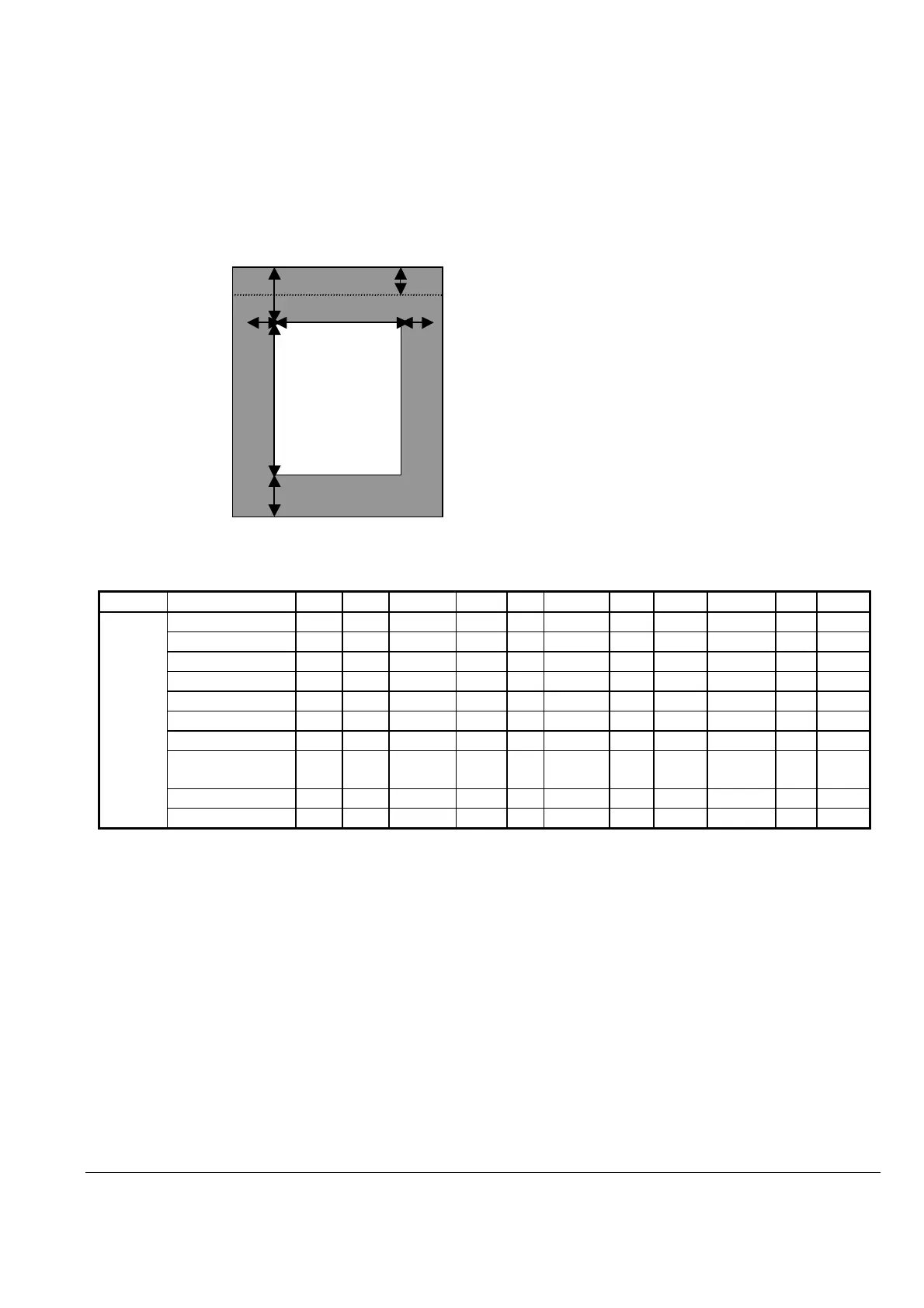
The printable areas of various paper sizes on the printer are defined hereafter. Values are expressed in dot units, where 1 dot =
1/360 inch. As is displayed in the following diagram, printable area can be defined as follows:
A’ = the width of the left override area
B’ = the width of the printable area
C’ = the width of the right override area
D’ = the length of the top override area
E’ = the length of the printable area
F’ = the length of the bottom override area
I = the length of the top override area (unprintable area)
D‘
I
A’ B’ C’
E’
F’
Table 3 Printable Area Dimensions (Zero margin/ Borderless)
The printing area is specified by A’, B’, D’, and E’.
Paper Size
US
EUR
ASIA/PAC
JPN
A’
B’ C’ D’ E’ F’
I
Cut Paper
A3 YES
YES
YES YES
0 4209 0 0 5953 0 0
10x12in./
NO
NO
NO YES
0 3600 0 0 4320 0 0
A4 YES
YES
YES YES
0 2976 0 0 4209 0 0
Letter YES
YES
YES YES
0 3060 0 0 3960 0 0
5x7in. / 2L Size YES
YES
YES YES
0 1800 0 0 2522 0 0
3.5x5in. / L Size YES
YES
YES YES
0 1261 0 0 1800 0 0
4x6in./10x15cm YES
YES
YES YES
0 1440 0 0 2160 0 0
100x148mm/
Postcard
NO
YES
YES YES
0 1417 0 0 2098 0 0
8x10in./
YES
YES
YES YES
0 2880 0 0 3600 0 0
16:9 wide YES
YES
YES YES
0 1440 0 0 2560 0 0
1) Only Photo Paper, Matte Paper – Heavyweight, Card are able to achieve margin less printing



 To Next Page