14 Solving Problems
Solving Problems
See your Basic Operation Guide or online
User’s Guide for help on using the printer
with a computer.
Error Messages
Problems and Solutions
Faxing problems
❏ If you have problems sending a fax,
make sure the phone cable is connected
correctly and verify that the phone line
works by connecting a phone to it. Also
make sure that your recipient’s fax
machine is turned on and working.
❏ If you have problems receiving a fax,
make sure paper is loaded correctly,
the phone cable is connected correctly,
and the phone line works.
❏ If you connected the product to a DSL
phone line, you must install a DSL filter
to the line or you will not be able to fax.
Contact your DSL provider for the
necessary filter.
❏ If your phone line has static or other
noise problems, turn off the V.34
setting and try faxing again
(& "Selecting Send/Receive Settings"
on page 12). If the problem persists,
turn off the ECM (Error Correction
Mode) setting and try faxing again.
Restore default settings
1. Press Mode [Copy/Fax] to select Fax
mode, and then press x Menu.
2. Press u or d to select 6.Restore Default
Settings, and then press OK.
3. Press u or d to display one of these
options:
❏ 1.Reset Fax Send/Receive Settings
❏ 2.Reset Fax Data Settings
❏ 3.Reset Settings, excluding Fax
❏ 4.Reset All Settings
4. Press OK to restore the default settings
you selected.
5. Press the 1 key (for Yes) to restore the
default settings.
6. Press x Menu to return to the first
screen in Fax mode.
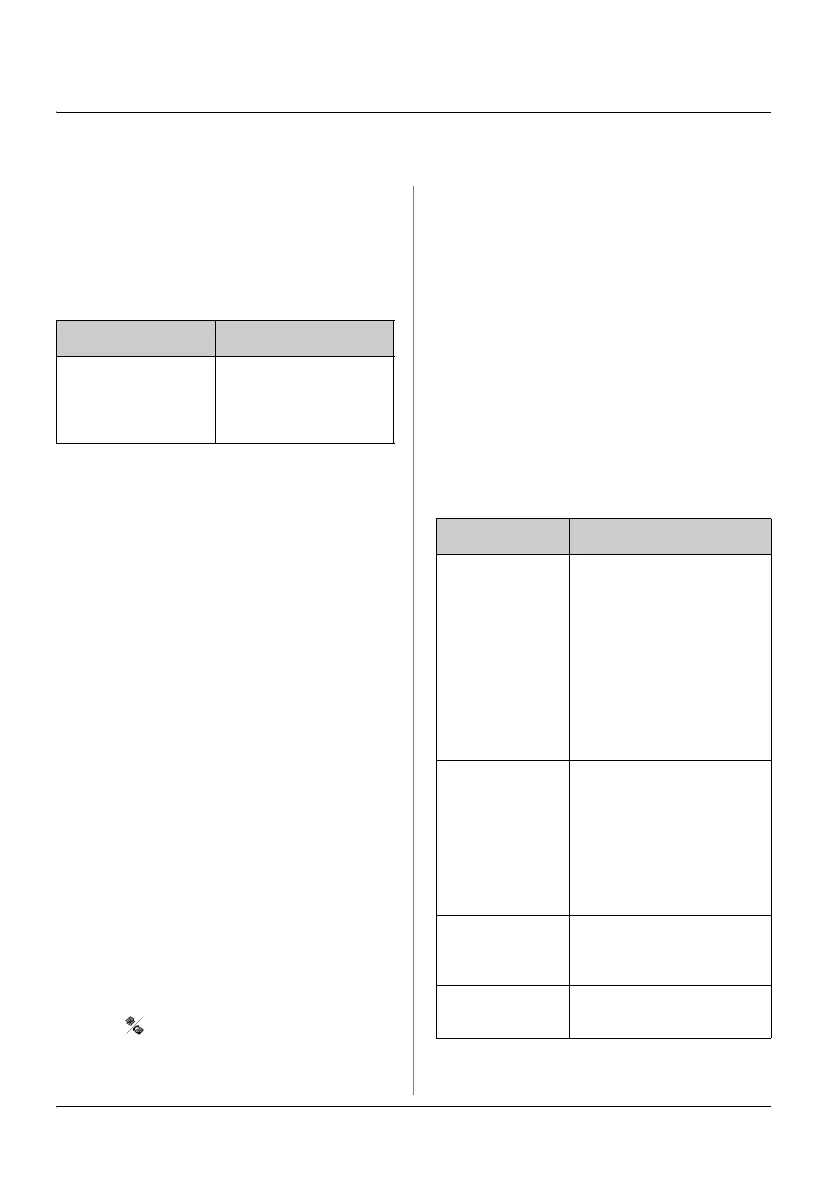
Error Messages Solution
No dial tone
Fax job
incomplete
Make sure the phone
cable is connected
correctly and the
phone line works.
Menu Description
Reset Fax
Send/Receive
Settings
Resets the following
items to the default
factory settings:
Scan & Print Setup
(Resolution/Contrast/Au
to Reduction/Last
Transmission Report),
Communication (Dial
Mode/DRD/ECM/V.34/R
ings to Answer/Dial
Tone Detection)
Reset Fax
Data Settings
Resets the following
items to the default
factory settings:
Speed Dial Setup,
Group Dial Setup,
Header (Fax
Header/Your Phone
Number), Fax Log
Reset
Settings,
excluding Fax
Resets all items except
for Fax settings to the
default factory settings.
Reset All
Settings
Resets all items to the
default factory settings.



 To Next Page
 Loading...






