Rev. A Utilities 3-9
UB-E02 Technical Reference Guide
CAUTION:
When you cannot check the MAC address on the label on the UB-E02 that is installed on
the printer, be sure to finish the TM Net WinConfig by clicking Close from the Device tab;
then turn off the printer and remove the UB-E02 to check it.
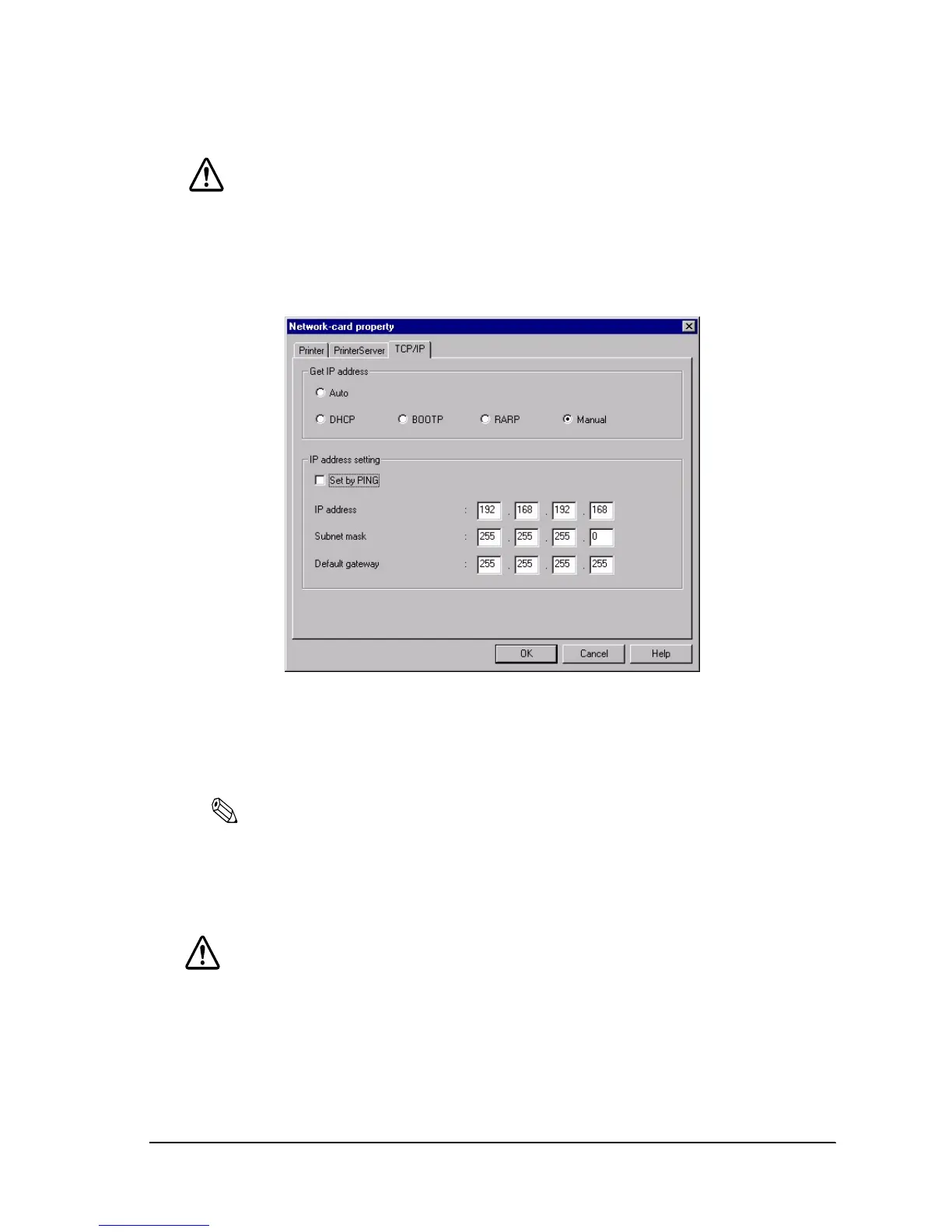
4. Double-click the TCP/IP tab.
5. You can acquire the IP address by Auto or Manual setting.
❏ Auto setting: Acquire the IP address, subnet mask, and default gate way from
DHCP server. A DHCP server is required.
Note:
Do not use the auto setting without a DHCP server. Refer to the manual of the server for setting.
❏ Manual setting: Assign the IP address, the Subnet mask, and the Default gateway.
Ask your administrator for the IP address and the Default gateway
to be set.
CAUTION:
Be sure that the Set by PING box is turned on if a setting by ping or arp command is
permitted.


 To Next Page