EasyManua.ls Logo

Epson VS335W - User Manual

Epson VS335W
207 pages
Print Icon
To Next Page IconTo Next Page
Loading...
EX3220/EX5220/EX5230/EX6220/EX7220/
VS230/VS330/VS335W User's Guide

Table of Contents

Other manuals for Epson VS335W

Questions and Answers

  • T
    trevor41Jul 27, 2025
    Why can't I monitor my Epson Software projector in standby mode?
    • F
      fletcherjefferyJul 27, 2025
      To monitor and control the Epson projector using EasyMP Monitor when it's in standby mode, ensure the projector's Standby Mode is set to Communication On (or Network On), or that Network Monitoring is set to On within the configuration menu.
  • A
    Angel BishopAug 3, 2025
    What to do if an e-mail message is not sent when a problem occurs with an Epson Software projector?
    • J
      Jamie PerezAug 3, 2025
      If you are not receiving email notifications when there's an issue with your Epson projector, verify that the SMTP server IP address, Port Number, and Recipient mail address have all been entered correctly in the settings.
  • Z
    Zachary RobertsAug 10, 2025
    How to fix Epson Software projectors that cannot be monitored or controlled?
    • S
      Sarah MendozaAug 10, 2025
      If the Epson projector cannot be monitored or controlled, check the following: 1. Ensure the network cable is correctly connected; reconnect if necessary. 2. Verify the Network configuration settings. 3. Reinstall EasyMP Monitor. 4. Register the projectors you intend to monitor or control.
  • N
    Natalie PerezAug 17, 2025
    Why is my Epson Software projector not sending e-mail alerts after a critical error?
    • B
      benjamin97Aug 18, 2025
      If your Epson projector has momentarily stopped working due to a critical problem, it won't be able to send email messages. If the projector cannot be reset after checking, contact Epson.

Summary

Introduction to Your Projector

Projector Features

Overview of the projector's key features and capabilities.

Projector Part Locations

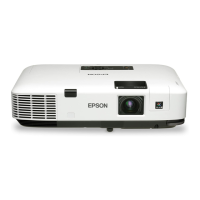
Visual identification of projector components and their locations.

Projector Part Locations

Projector Parts - Front;Top

Identifies and describes parts on the front and top of the projector.

Projector Parts - Rear

Identifies and describes ports and components on the rear of the projector.

Projector Parts - Control Panel

Explains the buttons and indicators on the projector's control panel.

Projector Parts - Remote Control

Describes the functions of each button on the remote control.

Setting Up the Projector

Projector Placement

Guidance on positioning the projector for optimal viewing.

Projection Distance

Information on determining the correct distance for desired image size.

Projector Connections

Instructions for connecting various input sources to the projector.

Installing Batteries in the Remote Control

Instructions for inserting batteries into the projector's remote control.

Using the Projector on a Network

Wireless Network Projection

Steps for setting up and performing projection over a wireless network.

Setting Up Wireless Network Security

How to configure WEP or WPA security for wireless connections.

Using Basic Projector Features

Turning On the Projector

Step-by-step guide for powering on the projector correctly.

Image Shape

Correcting image distortion (keystone effect) for a rectangular display.

Remote Control Operation

Guidelines for using the remote control effectively.

Projecting a PC Free Presentation

Displaying media directly from a USB device without a computer.

Adjusting Projector Features

Projector Security Features

Setting up security to prevent unauthorized use or theft.

Password Security Types

Overview of password protection options (Power On, User Logo, Network).

Adjusting the Menu Settings

Image Quality Settings - Image Menu

Adjusting visual parameters like color, brightness, and sharpness.

Input Signal Settings - Signal Menu

Configuring settings related to the input signal source and resolution.

Maintaining and Transporting the Projector

Projector Maintenance

General guidelines for keeping the projector in good working condition.

Replacing the Lamp

Detailed steps for safely replacing the projector lamp.

Transporting the Projector

Guidelines for safely packing and transporting the projector.

Solving Problems

Projection Problem Tips

Initial troubleshooting steps for common projector issues.

Projector Light Status

Interpreting status and error lights on the projector.

Solving Image or Sound Problems

Diagnosing and resolving issues with projected images or audio.

Solutions When No Image Appears

Troubleshooting steps when no image is displayed.

Solutions When No Signal Message Appears

Troubleshooting steps for the "No Signal" error message.

Solving Projector or Remote Control Operation Problems

Addressing issues with projector or remote control functionality.

Technical Specifications

General Projector Specifications

Detailed technical specifications for the projector.

Supported Video Display Formats

List of compatible video signal formats and resolutions.

Notices

Important Safety Information

Critical safety precautions for using the projector.

Important Safety Instructions

Detailed safety guidelines for setup and operation.

Epson VS335W Specifications

General IconGeneral
Brightness3, 300 lumens
Contrast Ratio15, 000:1
Aspect Ratio16:10
Display Type3LCD
Resolution1280 x 800
Native ResolutionWXGA (1280 x 800)
Lamp Life5000 hours (Normal), 10000 hours (Eco)
ConnectivityHDMI, VGA, USB
Zoom Ratio1.2x
Keystone CorrectionVertical: ±30 degrees, Horizontal: ±30 degrees
Video Modes480i, 480p, 576i, 576p, 720p, 1080i, 1080p
Speakers2W

Related product manuals