28 Printing and Copying Problems
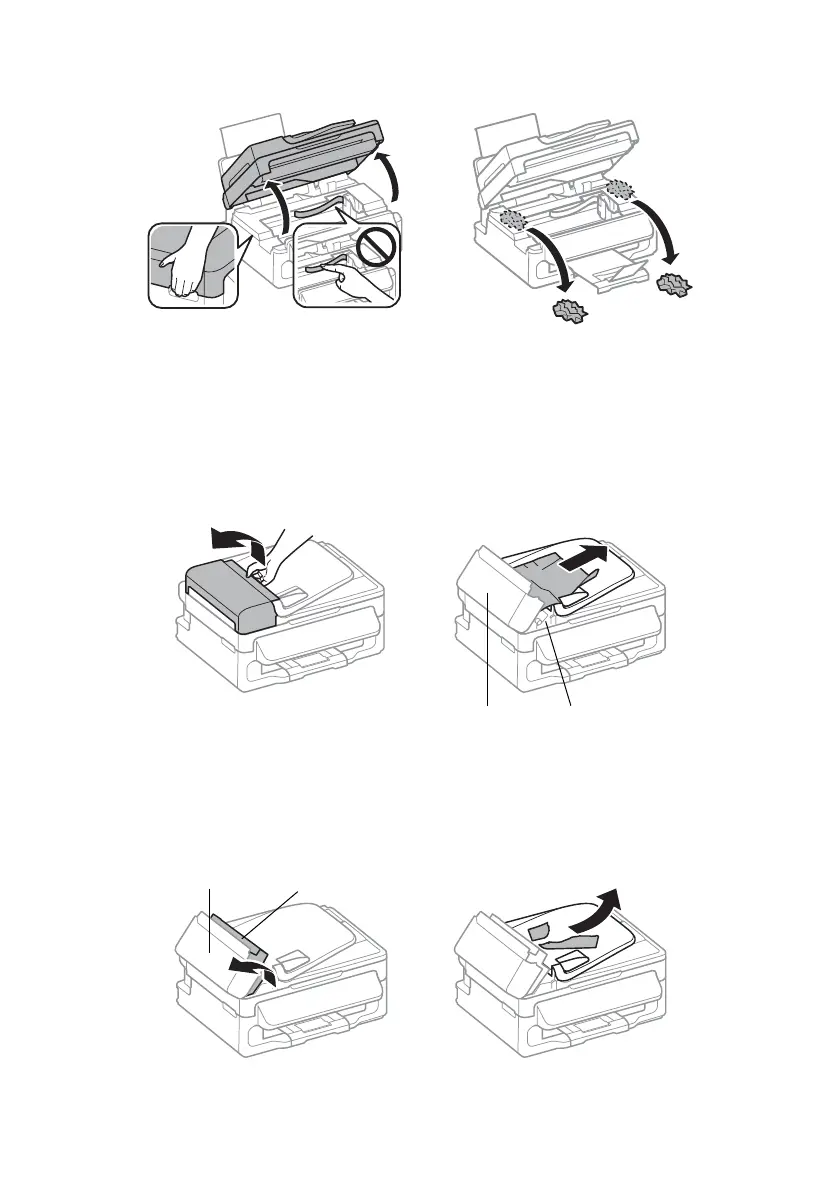
2. Carefully remove any paper trapped inside, including any torn pieces.
Caution: Do not touch the flat white cable inside the product.
3. Lower the scanner unit.
■ If documents don’t feed correctly in the Automatic Document Feeder (ADF), make
sure the paper is not bent, folded, or curled. If paper has jammed:
1. Open the ADF cover and remove any jammed paper.
Caution: Do not try to remove the paper without opening the ADF cover or you
could damage the mechanism.
2. Lift the paper feeder and remove all of the paper inside, including any torn
pieces. Then lower the paper feeder (but don’t close the ADF cover).
paper feederADF cover
ADF cover paper feeder















 To Next Page