46
Sleep function
The Sleep function can be used in Cooling mode. This function provides a more comfortable environment for sleeping.
1 - Switch on the appliance, choose the Cool mode and adjust the setpoint temperature and the fan speed
2 - Press the
button on the control panel or the
SLEEP
button on the remote control to activate the Sleep function.
3 - The function is automatically deactivated after 8 hours of operation and returns to the previously set mode.
Swing
Press the
SWING
button on the remote control to activate the swing of the air outlet.
Child Lock
Simultaneously press the
DRY
and
MODE
buttons on the control panel for 3 seconds to
lock or unlock the Remote Control
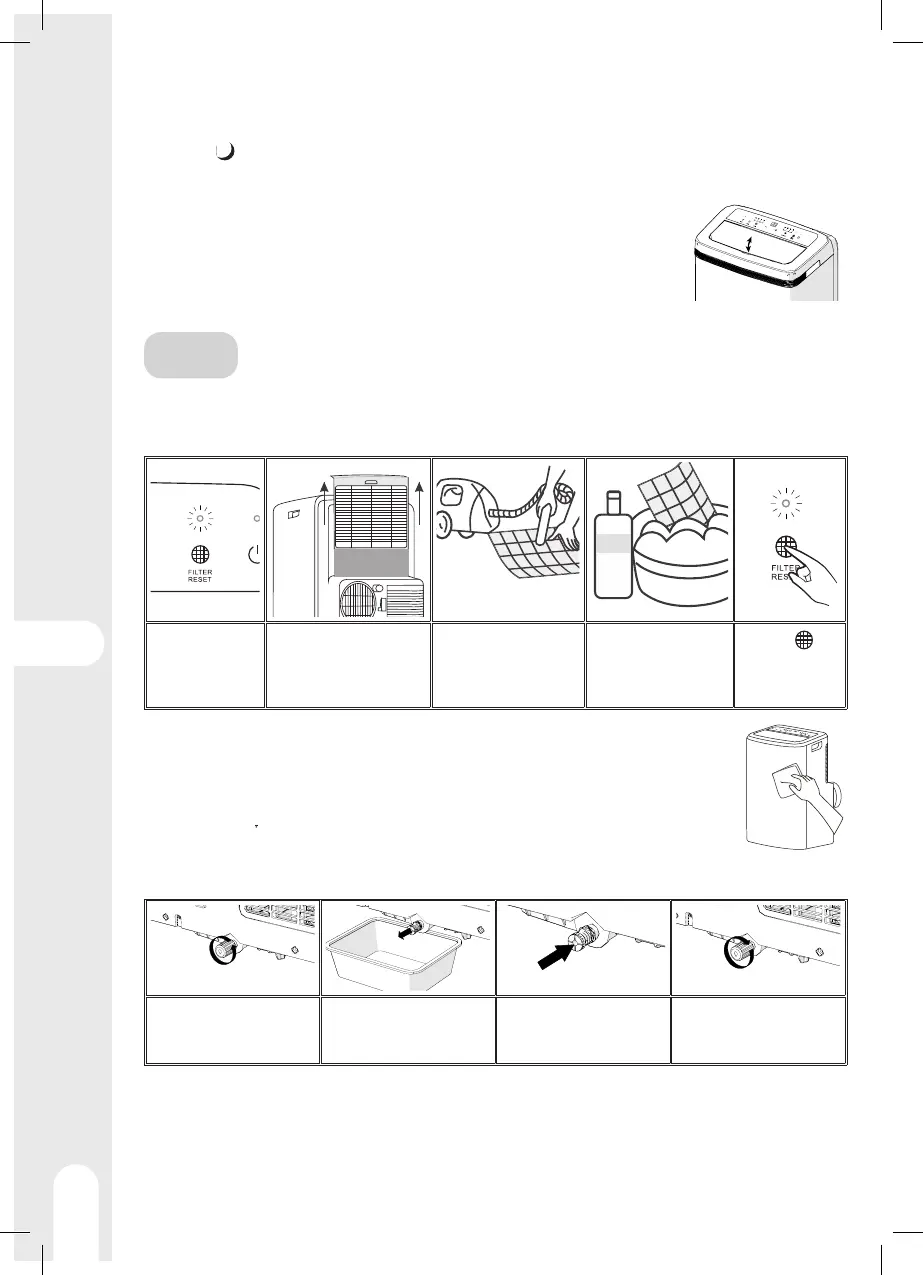
CARE
Cleaning the dust filter
It is advisable to clean the dust filter every 250 hours of use to promote proper air circulation and optimum performance of the
air conditioner.
The filter cleaning
indicator lights up
after 250 hours
of use
Open the rear of the device
and remove the filter
Remove dust from the
filter using a vacuum
cleaner
For strong stains, use
soapy water and dry
before replacing the
filter.
Press the
button to reset
the counter.
Cleaning of exterior parts
Use a soft, dry cloth. For strong stains, use a cloth dampened with soapy water and wipe immediately with a
dry cloth.
Emptying the water tank
In cooling mode, the internal water tank must be emptied regularly. If the display shows "P1", the tank must be emptied.
Switch o the device and
unscrew the lower cap
Bring the device above a
container and remove the
rubber cap
When the tank is empty,
replace the rubber cap
Screw the cap back on and
restart the appliance.



 To Next Page