
 Need help?
Do you have a question about the Equinox Systems Fusion 50 MKIII and is the answer not in the manual?
Crucial safety instructions, warnings, and operating determinations for safe use.
High voltage, moisture, and cable handling warnings, emphasizing careful operation and potential hazards.
Details the Fusion 50 MKIII's features, capabilities, and ideal use cases for mobile entertainers.
Lists key technical data including power, supply voltage, fuse type, dimensions, weight, and order code.
Presents beam angle lux data, fixture component identification, and included accessories.
Guides on setting DMX addresses and selecting channel modes for comprehensive fixture control.
Details the specific functions assigned to each channel in the 9-channel and 14-channel DMX modes.
Instructions for Master/Slave, Show, and Sound modes, including sensitivity adjustment.
Explains DMX512 protocol, linking multiple fixtures, and data transmission principles.
Details XLR connector pin configurations, cable requirements, and the importance of line termination.
Provides instructions for the correct and responsible disposal of electrical and electronic equipment.
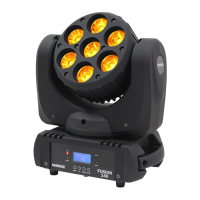
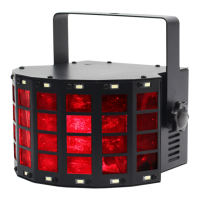
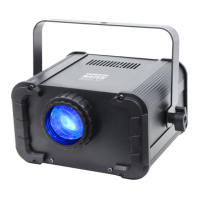
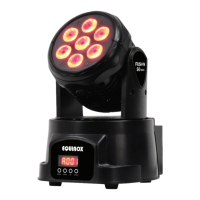
The Equinox Fusion 50 MKIII is a versatile moving head fixture designed for professional use, particularly well-suited for mobile entertainers. It offers a range of operational modes including DMX, auto, sound active, and master/slave, enabling the creation of stunning light shows.
The Fusion 50 MKIII is a lighting fixture that utilizes 7 x 10W quad-colour LEDs (RGBW) to produce a powerful and vibrant light output. Its primary function is to provide dynamic lighting effects through its pan and tilt capabilities, colour mixing, and dimming features. The fixture can be controlled via a DMX controller, allowing for precise and individual control over its traits, or it can operate autonomously using its internal programs. In master/slave mode, multiple units can be synchronised to create a coordinated light show. The sound active mode allows the fixture to react to music, adding an interactive element to performances.
The Fusion 50 MKIII offers a user-friendly interface with a 4-push button menu and LED display for easy navigation and setting adjustments.
DMX Mode: In DMX mode, users can set a DMX start address from 1-512. The fixture requires one or more channels for control, and the start address determines which DMX channels the fixture will read data from. For example, if a fixture uses 7 channels and is addressed to start on DMX channel 100, it will read data from channels 100 through 106. It is crucial to choose start addresses that do not overlap for other units in the DMX chain. The fixture supports DMX 512 protocol and can be linked with other DMX-compliant devices using standard 3-pin XLR connectors. The DMX channel mode allows selection between 9 or 14 DMX channels, providing different levels of control over the fixture's parameters.
9 Channel Mode:
14 Channel Mode:
Master/Slave Mode: To set a master unit, the user selects "NASE" (Master) from the "SLNd" menu and then chooses a desired program (sound active or auto). Slave units are set to "SL 1" or "SL 2" from the "SLNd" menu to run in sequence with the master unit. All slave units must be set to the same DMX channel mode as the master unit for proper synchronization.
Show Mode: The fixture includes internal show modes, accessible via the "5h0d" menu, allowing users to select from pre-programmed light sequences (5h 0-5h 4).
Sound Mode and Sensitivity: Users can enable or disable sound mode ("on" or "oFF") via the "50Un" menu. The sound sensitivity can be adjusted from 000 (low) to 100 (high) using the "SEn5" menu, allowing the fixture to respond to different audio levels.
Other Settings: The menu also provides options for backlight control ("on" or "oFF"), display invert ("YES" or "OU"), pan invert ("YES" or "no"), tilt invert ("YES" or "no"), and a reset factory settings option ("YES" or "UO").
 General
| Brand | Equinox Systems |
|---|---|
| Model | Fusion 50 MKIII |
| Category | DJ Equipment |
| Language | English |

 To Next Page