EasyManua.ls Logo

Equinox Systems Shard - User Manual

Equinox Systems Shard
12 pages
Print Icon
To Next Page IconTo Next Page
Loading...
Order codes:
EQLED367 - Black Housing
EQLED367A - White Housing
Shard
User Manual
Question and Answer IconNeed help?

Do you have a question about the Equinox Systems Shard and is the answer not in the manual?

Summary

Safety Advice

IMPORTANT Safety Precautions

Manufacturer liability, cable handling, and general usage precautions.

Operating Determinations

Conditions for use, condensation, product failure, and service.

Product Overview and Technical Specifications

Product Description

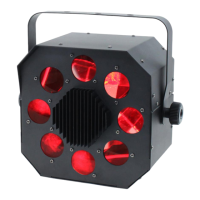
High output moonflower with Osram Ostar™ quad-colour RGBW LED.

Key Features

Lists features like DMX channels, sound active, master/slave, dimming, etc.

Specifications Table

Details on power, fuse, dimensions, weight, and order codes.

Rear Panel Overview

Component Identification

Identifies numbered parts of the unit's rear panel.

Package Contents

Lists items included in the box.

Operating Instructions - Menu Navigation

DMX Address and Channel Modes

Setting DMX address and selecting channel modes (1, 4, 7).

Master;Slave and Show Modes

Configuring master/slave sync and selecting show programs.

Sound Active and Sensitivity

Enabling sound active mode and adjusting sensitivity.

System Settings Control

Managing DMX loss, backlight, display invert, test, temp, hours, version.

Operating Instructions - DMX Modes

DMX Mode Operation Details

Detailed steps for operating the fixture in DMX mode.

1-Channel DMX Mode Functions

Functions and values for the 1-channel DMX mode.

4-Channel DMX Mode Functions

Functions and values for the 4-channel DMX mode.

7-Channel DMX Mode Functions

Functions and values for the 7-channel DMX mode.

Operating Instructions - Advanced Modes

Master;Slave Synchronization

Setting up master and slave units for synchronized operation.

Show Mode Selection and Behavior

How to select and use different built-in show programs.

Sound Active Mode Operation

Enabling and adjusting sound-activated mode.

Sound Sensitivity Adjustment

Fine-tuning the audio input sensitivity.

Operating Instructions - System Settings

DMX Signal Loss and LED Backlight

Response to DMX loss and controlling LED backlight.

Display Invert and Fixture Test

Inverting display and running fixture self-test.

Fixture Status Monitoring

Viewing temperature, usage hours, and software version.

CA 8 Remote Control Operation

CA 8 Controller Interface

Using the CA 8 controller for unit operation.

Blackout Functionality

Turning the fixture off using the Stand By button.

Mode Selection via CA 8

Switching between strobe, auto, and show modes.

Function Button Usage

Adjusting settings within selected modes.

DMX Setup and Connectivity

Setting the DMX Address

How to assign a unique DMX start address.

DMX 512 Protocol Explained

Explanation of the DMX protocol.

DMX Linking Procedures

Connecting multiple fixtures in a DMX chain.

DMX Data Cable Specifications

Specifications for DMX cables and connectors.

DMX Setup and Wiring

XLR Pin Configuration Details

Wiring details for 3-pin and 5-pin XLR connectors.

Line Termination for DMX

Importance and use of DMX terminators for signal integrity.

5-pin XLR to 3-pin DMX Adapting

Adapting 5-pin XLR to 3-pin DMX lines.

WEEE Disposal Notice

Correct Disposal of Product

Guidelines for environmentally safe disposal of electrical equipment.

Summary

Safety Advice

IMPORTANT Safety Precautions

Manufacturer liability, cable handling, and general usage precautions.

Operating Determinations

Conditions for use, condensation, product failure, and service.

Product Overview and Technical Specifications

Product Description

High output moonflower with Osram Ostar™ quad-colour RGBW LED.

Key Features

Lists features like DMX channels, sound active, master/slave, dimming, etc.

Specifications Table

Details on power, fuse, dimensions, weight, and order codes.

Rear Panel Overview

Component Identification

Identifies numbered parts of the unit's rear panel.

Package Contents

Lists items included in the box.

Operating Instructions - Menu Navigation

DMX Address and Channel Modes

Setting DMX address and selecting channel modes (1, 4, 7).

Master;Slave and Show Modes

Configuring master/slave sync and selecting show programs.

Sound Active and Sensitivity

Enabling sound active mode and adjusting sensitivity.

System Settings Control

Managing DMX loss, backlight, display invert, test, temp, hours, version.

Operating Instructions - DMX Modes

DMX Mode Operation Details

Detailed steps for operating the fixture in DMX mode.

1-Channel DMX Mode Functions

Functions and values for the 1-channel DMX mode.

4-Channel DMX Mode Functions

Functions and values for the 4-channel DMX mode.

7-Channel DMX Mode Functions

Functions and values for the 7-channel DMX mode.

Operating Instructions - Advanced Modes

Master;Slave Synchronization

Setting up master and slave units for synchronized operation.

Show Mode Selection and Behavior

How to select and use different built-in show programs.

Sound Active Mode Operation

Enabling and adjusting sound-activated mode.

Sound Sensitivity Adjustment

Fine-tuning the audio input sensitivity.

Operating Instructions - System Settings

DMX Signal Loss and LED Backlight

Response to DMX loss and controlling LED backlight.

Display Invert and Fixture Test

Inverting display and running fixture self-test.

Fixture Status Monitoring

Viewing temperature, usage hours, and software version.

CA 8 Remote Control Operation

CA 8 Controller Interface

Using the CA 8 controller for unit operation.

Blackout Functionality

Turning the fixture off using the Stand By button.

Mode Selection via CA 8

Switching between strobe, auto, and show modes.

Function Button Usage

Adjusting settings within selected modes.

DMX Setup and Connectivity

Setting the DMX Address

How to assign a unique DMX start address.

DMX 512 Protocol Explained

Explanation of the DMX protocol.

DMX Linking Procedures

Connecting multiple fixtures in a DMX chain.

DMX Data Cable Specifications

Specifications for DMX cables and connectors.

DMX Setup and Wiring

XLR Pin Configuration Details

Wiring details for 3-pin and 5-pin XLR connectors.

Line Termination for DMX

Importance and use of DMX terminators for signal integrity.

5-pin XLR to 3-pin DMX Adapting

Adapting 5-pin XLR to 3-pin DMX lines.

WEEE Disposal Notice

Correct Disposal of Product

Guidelines for environmentally safe disposal of electrical equipment.

Equinox Systems Shard Specifications

General IconGeneral
ManufacturerEquinox Systems
ModelShard
Pitch ControlYes
Jog WheelYes
OutputsRCA
Headphone Output1/4" Jack