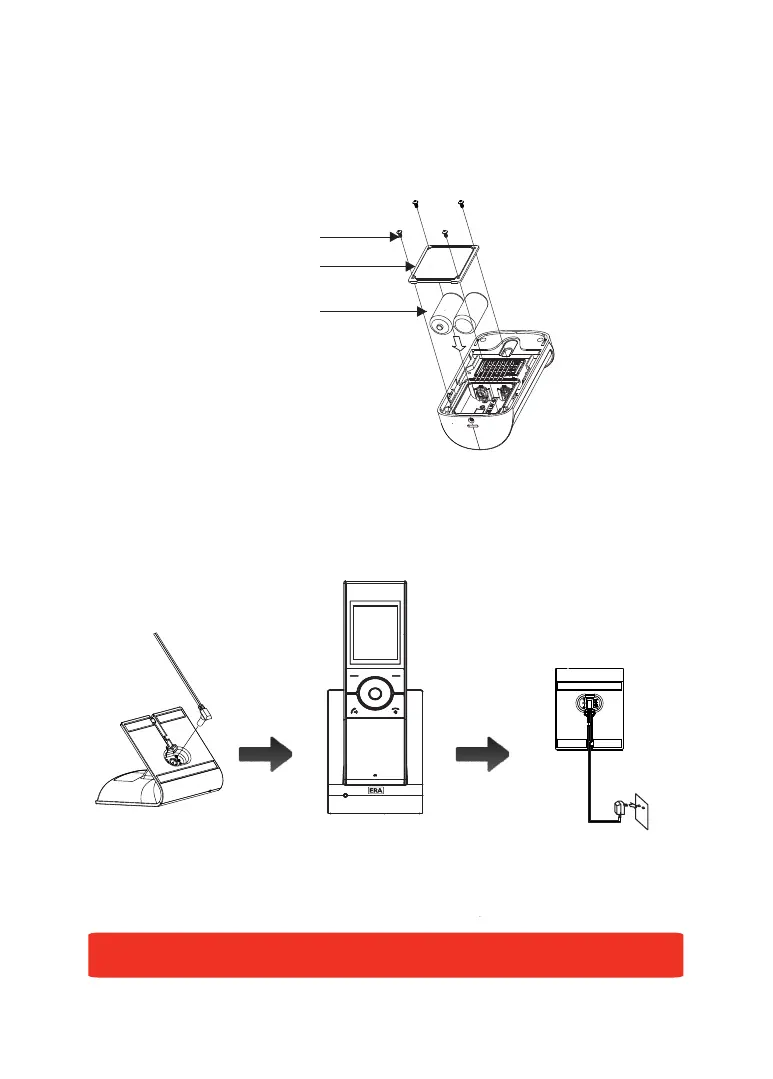
screw
battery cover
battery
-5-
Outdoor Camera Battery Installation:
1. Fit two 'C' Size 1.5V batteries (not supplied) into the battery compartment.
2. Fix the battery cover in place using the four screws provided.
The status of the Outdoor Camera batteries is shown in the top left-hand corner of
the screen when in Monitoring Mode and during a call.
Charging the Video Handset:
Connect the modular end of the AC power adapter to the power jack of the charger,
then plug the AC adapter into a suitable mains socket. Fully charge the handset
prior to initial operation (approx. 5 hours).
Note: When the handset is charging, the 'Unlock' button will be illuminated.


 To Next Page