Setup
-16-
Note: If you reset the video handset to the factory default, ALL settings will
revert to the default condition.
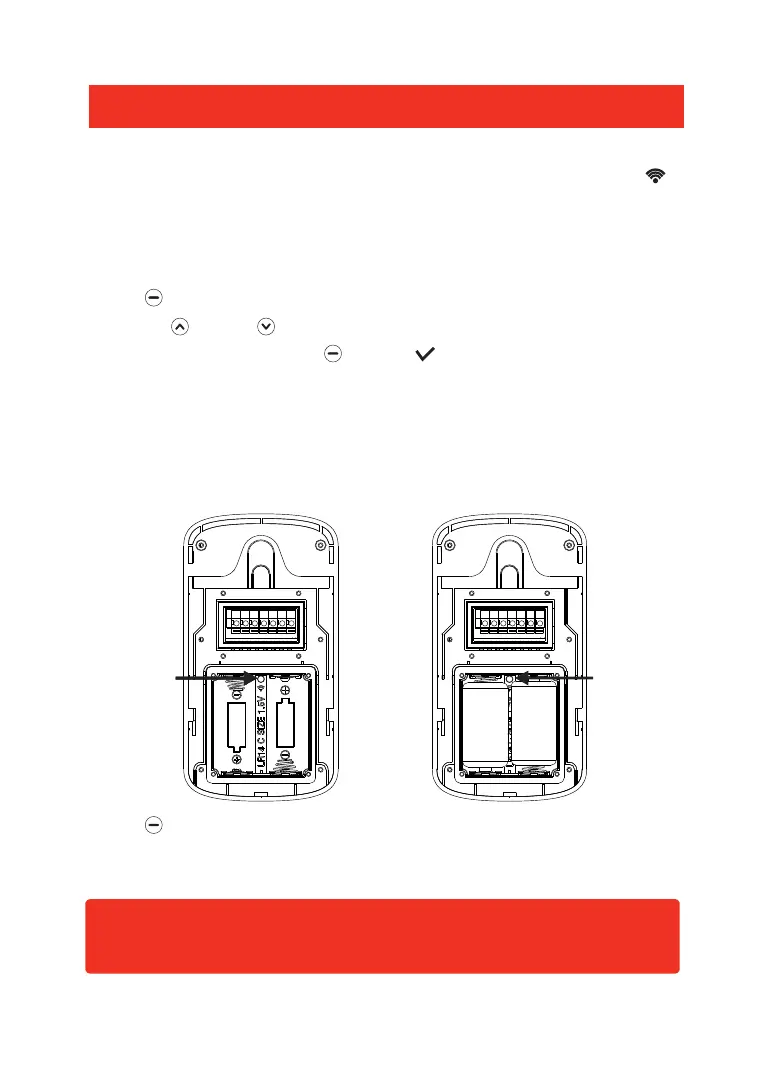
1. Insert a small screwdriver or similar item into the depression just above the ' '
symbol inside the outdoor camera battery compartment, and depress the register
button with the screwdriver for 3 seconds. The unit will sound an indication tone
and the call button backlight will illuminate.
2. Press beneath Menu on the video handset, then select the Register menu,
press Up or Down to choose the door camera that you want to connect
(1-2 are selectable), then press beneath ' ' to confirm the setting. The
outdoor camera will automatically search for the video handset to be registered.
When the video handset sounds an indication tone, the outdoor camera and
video handset are registered successfully.
Register
Register
button
Register
button
3. Press beneath Menu, then select the Register menu. The system will enter
into the 'Register' interface indicating that the outdoor camera is successfully
registered to the video handset.
Battery compartment
'batteries not fitted'
Battery compartment
'batteries fitted'


 To Next Page