Battery Installation & Power
-4-
1.
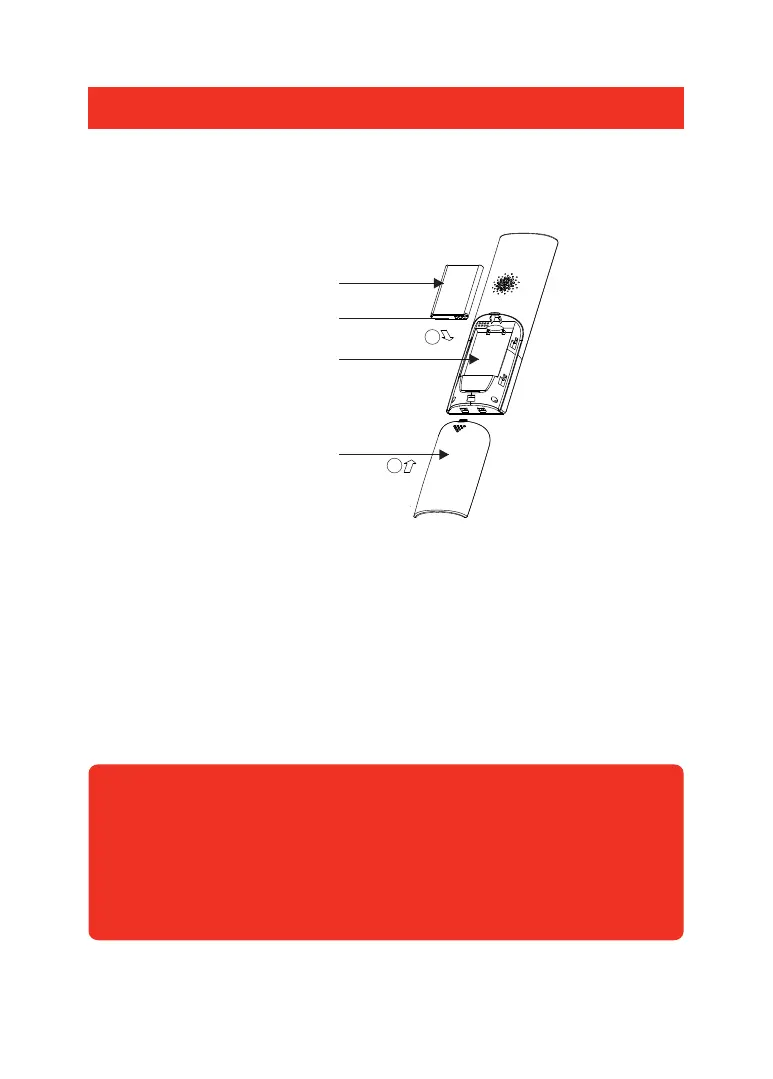
Lithium battery
Battery case
Battery compartment cover
2
1
Protective cover
Video Handset Battery Installation:
Fit the rechargeable lithium battery (3.7V,1100mA) supplied,as follows:
1. Remove the battery compartment cover by pushing down on the raised arrow
and sliding the cover in a downward direction.
2. Remove the battery’s protective film and insert the battery into the battery
compartment, taking care to correctly match the polarity (+, -).
3. Replace the battery cover by sliding it upwards until it snaps in place.
Notes:
1. Should the battery not reach its full storage capacity after recharging,
replace with a new battery.
2. When replacing the battery use only an equivalent lithium battery.
Do NOT use any other battery type.
The status of the Handset battery is shown in the top right-hand corner of the
screen when in Standby Mode.


 To Next Page