ERBAUER 250MM TABLE SAW
ERBAUER 250MM TABLE SAW
ERBAUER 250MM TABLE SAW
ERBAUER 250MM TABLE SAW
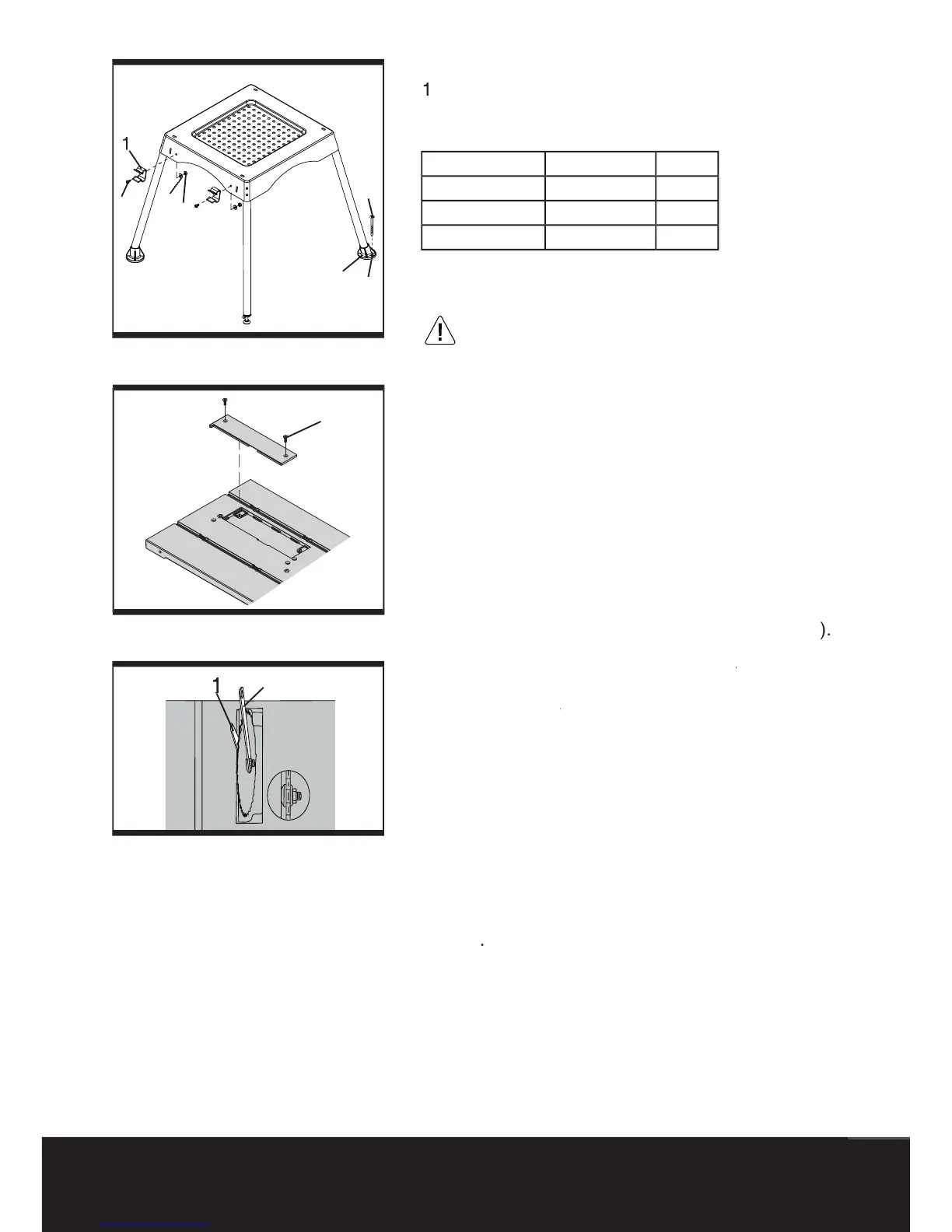
Installing the rip fence storage
) Attach the fence storage clips (1) to the left of the
stand assembly with screws (2) washers (3) and
nuts (4) for rip fence storage (
Installing and changing the blade
To avoid injury from accidental starting,
turn the switch off (“0”) and remove the
from the power source before changing the
The riving blade must have constant clearance
along its length and not be in contact with the
the gloves during removing a
nsure that the saw blade bore is exactly the
correct size for this machine and the diameter
1) Loosen the screws (3) on the table insert by a
screwdriver and remove the table insert
2) Raise the saw blade to its maximum height.
3) Use the supplied open end
spanner (1) to keep spanner
the arbor from turning and place the supplied
(2) on the arbor nut, and turn
spanner (2) on the arbor nut, and turn spanner
counterclockwise to loosen the arbor nut
4) Remove the arbor nut and outer fl ange.
5) Replace the saw blade. Make sure the teeth of
the blade point down at the front of the table.
6) Assemble the arbor fl ange and arbor nut back to
the saw arbor and tighten the arbor nut by turning
the supplied box-end spanner (2) clockwise (to the
7) Replace the table insert and retighten the two



 To Next Page