-13-
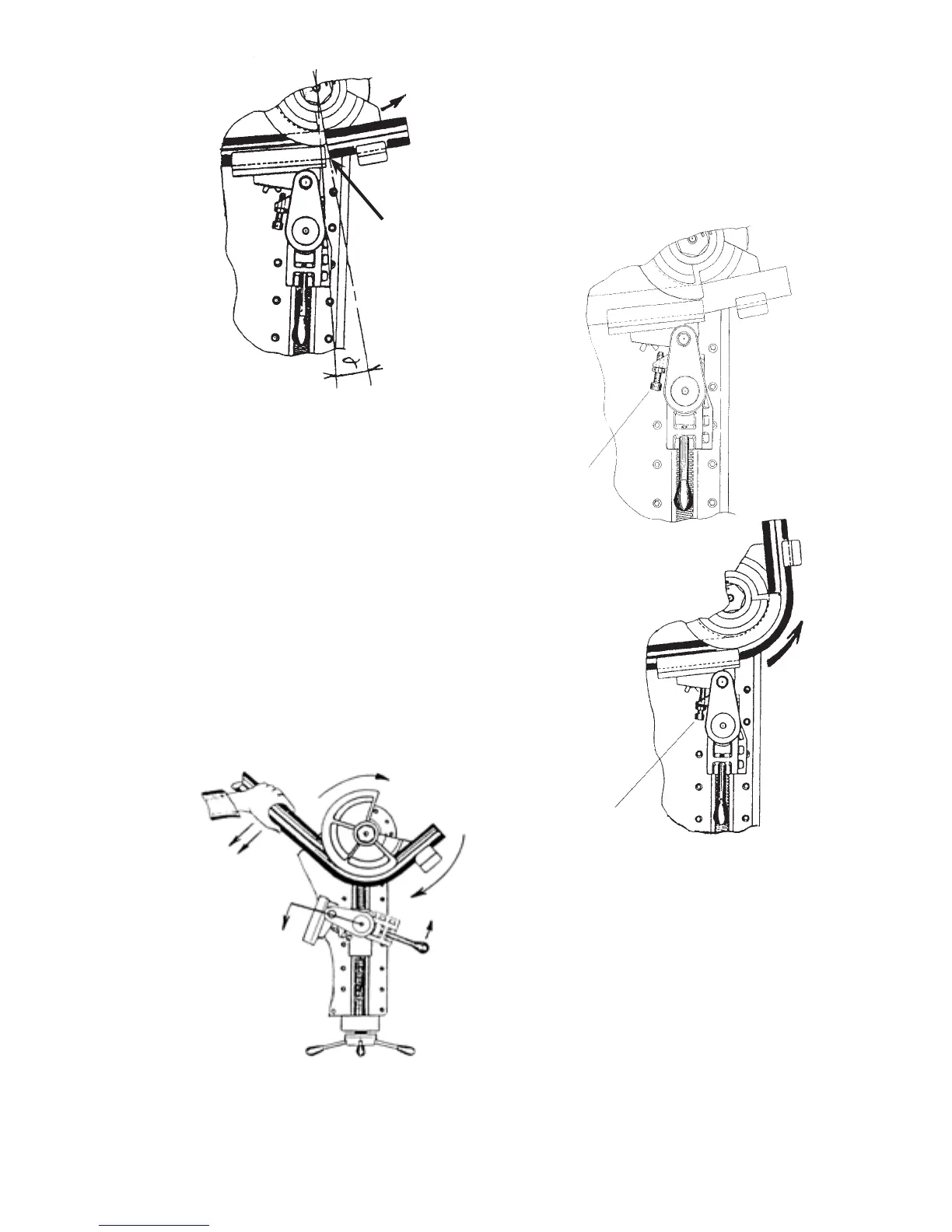
(FIG. 4)
- Adjusting counterbending die support screw -
Using Allen wrench, turn adjustment screw until
contacting back side of vise. Secure screw with
locking jam nut (see FIG. 2). Adjustment screw
affects quality of bend and must be set for each material.
- Finishing bend -
Hold bend switch or depress and hold foot pedal
completing bend cycle (see FIG. 3).
- Return center former to “0” position -
Hold bend switch or depress return foot pedal until bender
returns to “0” home position (see FIG. 4).
- Editing bend angles and springback values -
Bend angles and springback values can be edited at any time during a bend cycle using rotary switches on
control board.
Pipe deected
from straight
position
(FIG. 1)
(FIG. 2)
HOW TO USE THE ADJUSTMENT SCREW
ADJUSTMENT
SCREW
ADJUSTMENT
SCREW
(FIG. 3)


 To Next Page