- 12 -
d. Selecting “Option”, press “OK” key then input the option code by number keys on the remote handset according to the
A. Option code. After changing “OPTION”, the TV set must be set to standby and power on again, then enter
into “SERVICE MENU”.
e. Select “Adjustment”, press “OK” key on the remote handset. The “ADJUST MENU” is indicated with each parameter
on the screen. Pressing channel “ ” and “ ” keys can select the responding parameter. The parameter value
can be changed by pressing volume “+” and “-” keys. Press “OK” key to exit.
f. Select “Other Adj.” press “MENU/OK” (or press “OK” key on the remote handset), On-screen display will be
shown as follows:
1. Production
Normal “Production” is set to “off”, if “Production” is set to “on”, the TV set can’t standby and appeared BLUE
BACK when no RF signal inputting, the top on the On-screen will display a “P” character when changing
channel, this feature is for production use only. press volume “+” and “-” keys to set to “off” or “on”, press
“MENU” to EXIT.
2. AFT-Step
Selecting “AFT-Step” to set AFT DATA, press “OK” key to enter, On-screen display will be showed as follows:
Use channel “
” and “ ” keys to select the parameter, the parameter value can be changed by pressing
volume “+” and “-” keys. See “D. AFT data setting”. Press “M” key to exit.
3. IPC
Selecting “IPC” to set picture mode data, press “OK” key to enter, the picture mode data is indicated with
each parameter on the screen. Press “I.P.C.” key to select picture mode, select the parameter and change
the parameter value, when this picture mode data is OK, press “OK” key to store, the parameter value below
will display “Stored”, when all picture mode data is being stored, press “MENU” key to exit.
iii. Adjustment of AFC
a. Preparation procedure
1. Turn on the main power switch.
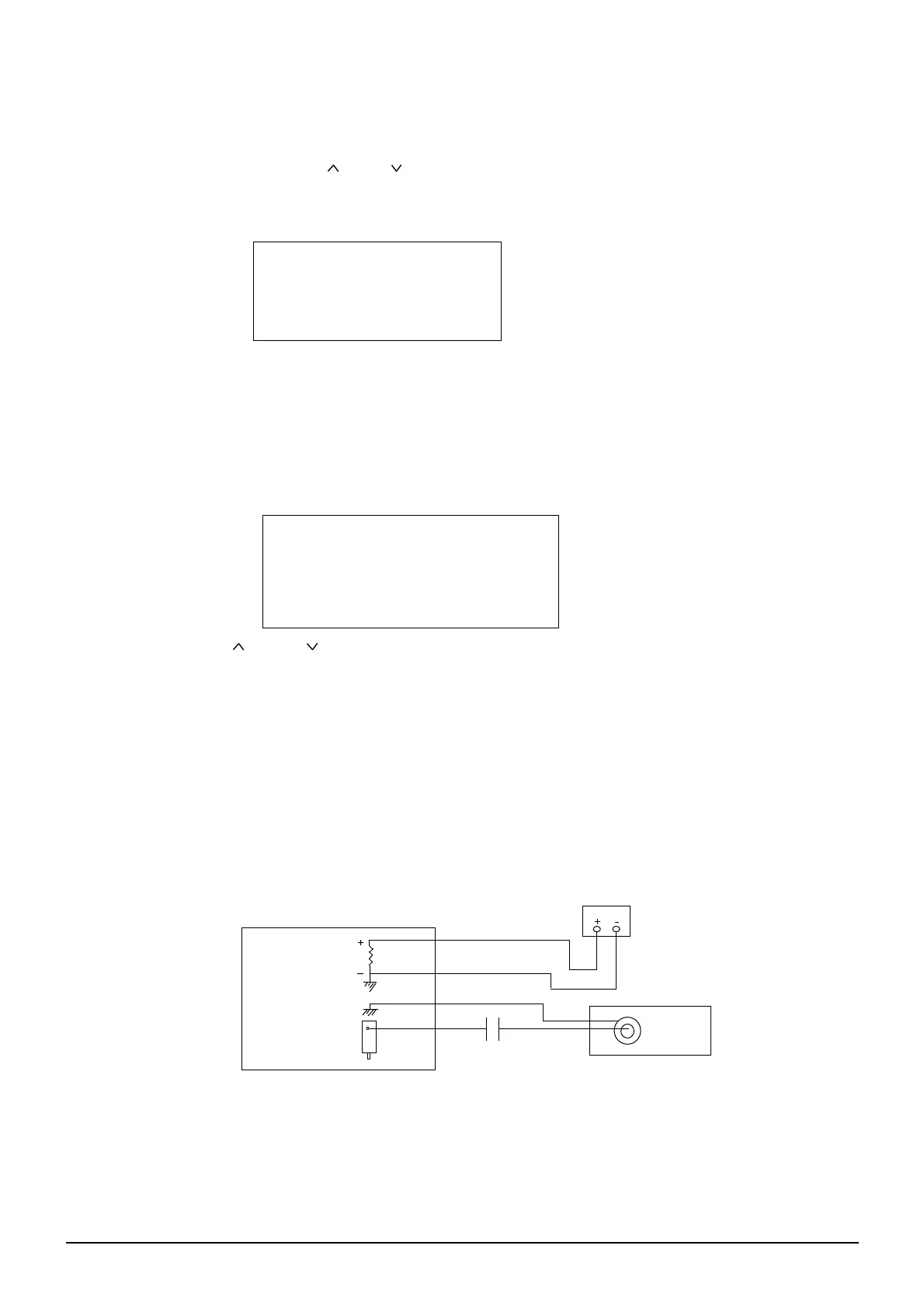
2. Set digital voltmeter at DC, then connect its probes across of R603 and GND.
3. Add 100dBµV IF signal between IF Pin and GND of the TUNER on main PC board (see FIG.1).
b. Adjustment Step
Adjust the “AFT ADJ” DATA until the meter indicates 2.4±0.1V.
KWUAA AFT-STEP 09-08
Band VHFL
Low 120
Middle 97
High 131
Sine Wave
Signal
DIGITAL VOLTMETER
R603
(FIG.1)
KWUAA OTHER
Production off
AFT-Step
IPC


 To Next Page
 Loading...