8
GB
PRELIMINARY HARDWARE
SETTINGS
1) Remove the instrument from its case.
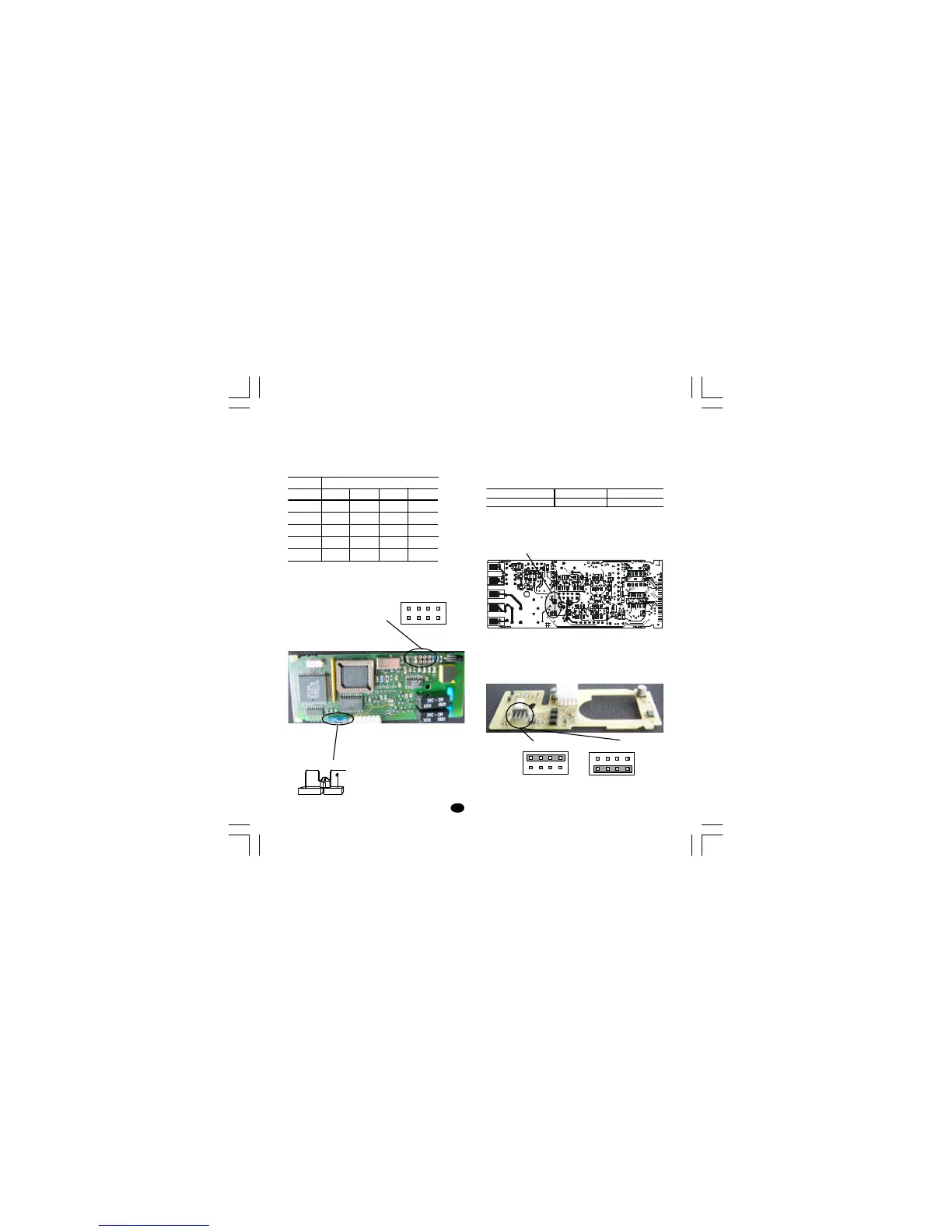
2) It is necessary to set J1 according to the desired
input type as shown in the following figure.
INPUT J1
TYPE 1-2 3-4 5-6 7-8
TC close open open open
60 mV close open open open
5 V open close open open
10 V open open close open
20 mA open open open close
OPEN INPUT CIRCUIT
This instrument is able to identify the open circuit
for TC input.
For TC input, it is possible to select overrange
indication (standard) or underrange indication set-
ting the CH1 and SH1 according to the following
table:
Overrange (STD) CH1 = close SH1 = open
Underrange CH1 = open SH1 = close
Both pads are located on the soldering side of the
CPU card
Logic input - serial interface selection
When both options are fitted, select the desired
function by setting J105 as follows:
Fig.15Fig. 13
Fig. 14
Fig. 13
SH1 CH1
SW1
1 3 5 7
2 4 6 8
J1
J105
Logic inputs
1 3 5 7
2 4 6 8
1 3 5 7
2 4 6 8
RS-485
Nuovo-1 15/09/2005, 9.458


 To Next Page