31
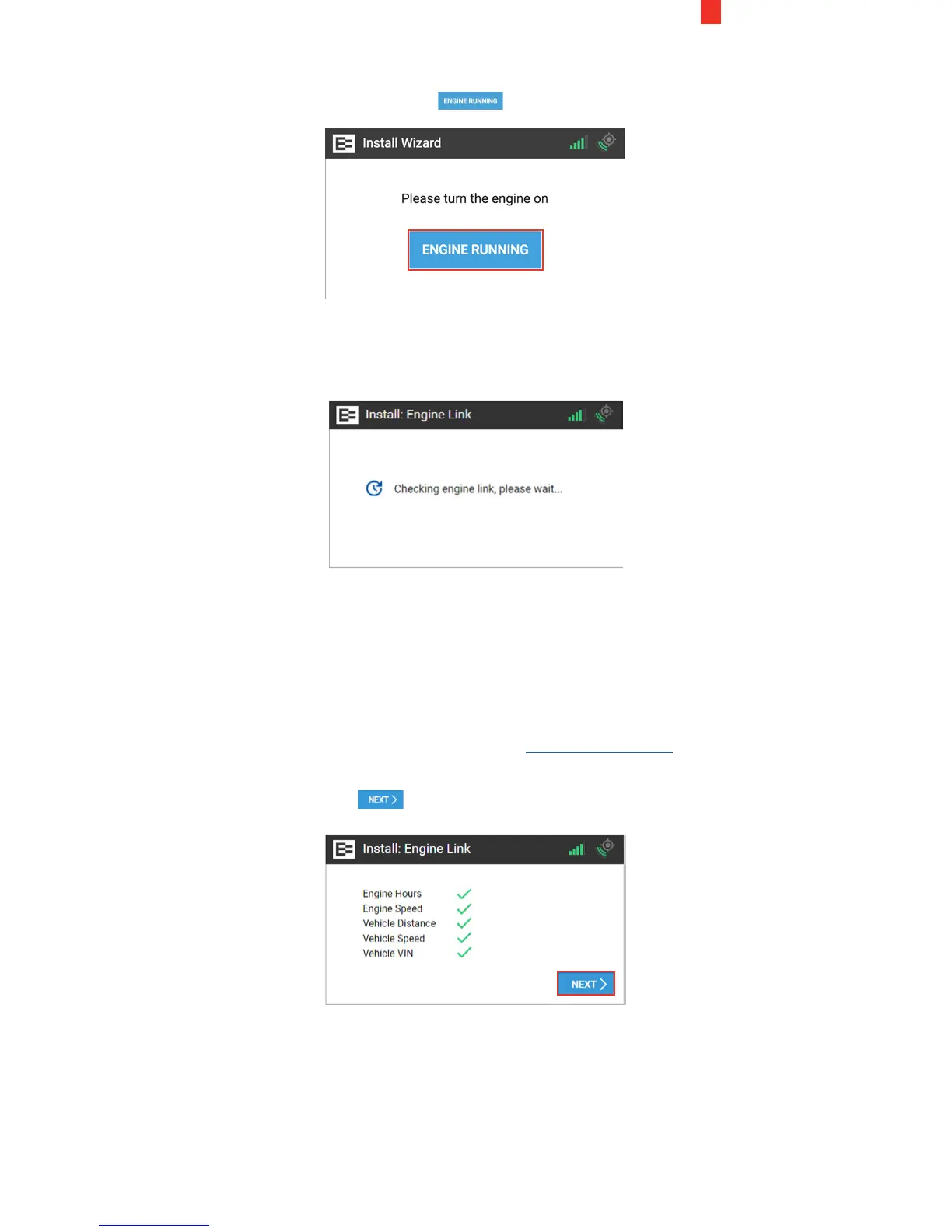
10. Turn the engine ON and ensure that it is running (not just ON).
11. Tap the Engine Running button.
The Ehubo starts counting down as it receives data from the
OBD-II adapter.
Watch the seconds tick down until it is ready for the next step.
Next, the Ehubo displays the system checks on engine speed and
hours, vehicle speed, distance, and VIN. This means that it has
retrieved all required data.
NOTE: A red X instead of a green check mark appears, or the
"Something is not quite right" screen appears, if you are missing
data. You might be prompted to enter the odometer reading
or the VIN. Check the Troubleshooting section 8.3, if you need
assistance. You may contact EROAD at support@eroad.com
after completing the troubleshooting steps, if needed.
12. Tap the Next button.
13. Physically turn OFF the truck. Notice the key icon has turned
red, which is located on the upper right corner of the Ehubo.


 To Next Page