5
Controls & Features
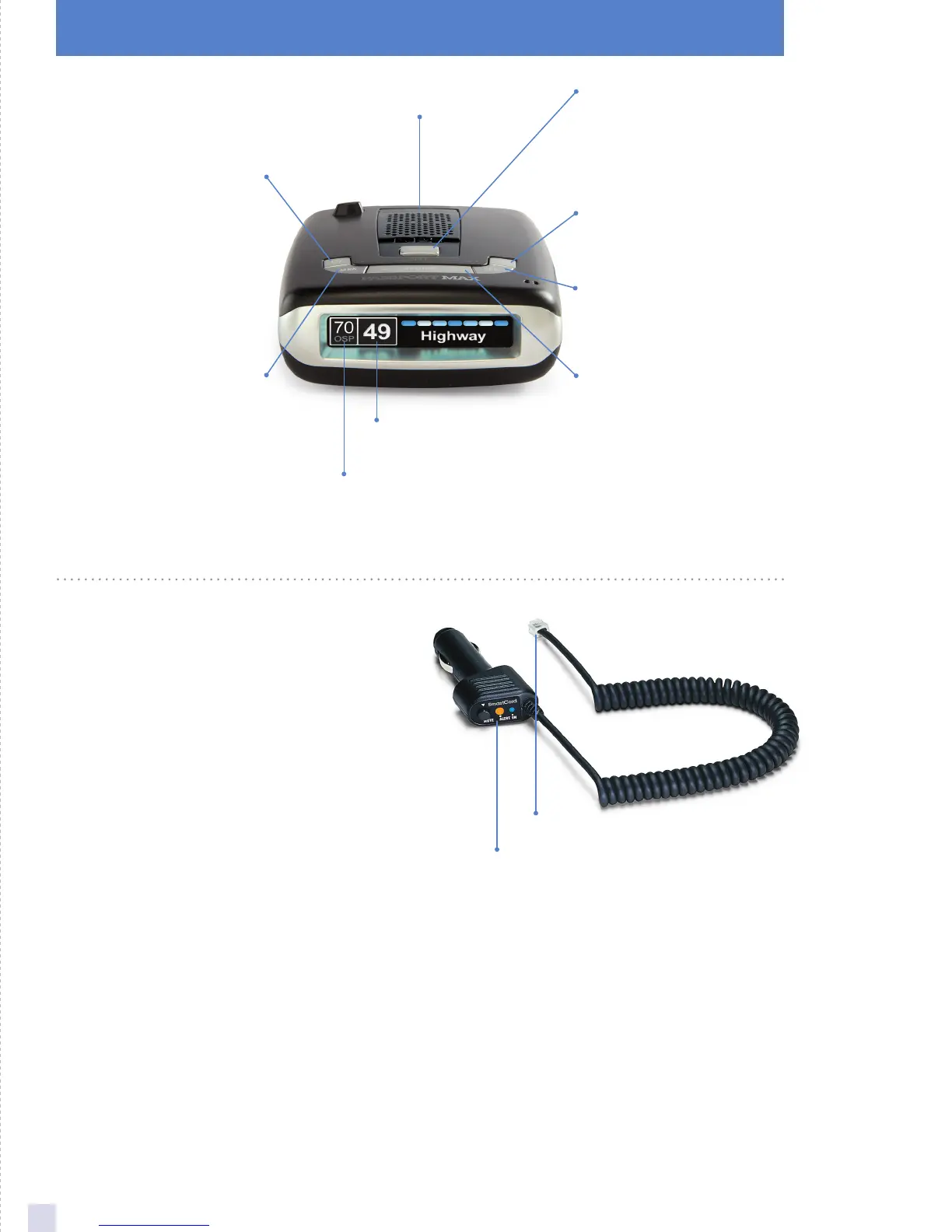
Display
OverSpeed alert setting
that can be adjusted in
Preferences. Speed limit
data will show here when
connected to ESCORT Live
MRK
To mark a location for
future alerts, press MRK
twice, then VOL + or –
to select the type of
marker, then MRK
again to confirm. Press
twice while receiving
marker alert to unmark
Display
Showing current speed
Power
Press to turn Max
on or off
Mute
Press to mute an alert;
press three times to
lock out a false alert;
press twice while
receiving a locked-out
alert to unlock
BRT
Press to adjust display
brightness (Min, Med,
Max, Auto, Dark)
SEN
Press to adjust detector
sensitivity (Highway,
Auto, Auto NoX)
Volume
Press and hold + or −
to adjust volume
Mount Release
Press to remove device
from mounting
bracket
SmartCord
The SmartCord is a special power cord that has a
power-on indicator, a bright alert light that warns of
radar or laser, and a convenient MUTE button right on
the plug. It’s perfect for any car where reaching the
detector’s MUTE button on the windshield is a stretch.
For discreet night driving, put PASSPORT Max in Dark
mode and use the SmartCord for your visual alerts.
Other drivers won’t know you have a detector.
For descriptions of features and functions available
when connected to SmartCord Live with ESCORT
Live, visit escortinc.com and download the SmartCord
Live user manual for your iOS or Android OS
smartphone.
Modular Connector
Plugs into detector jack
Lighter Adapter
Connects to lighter/accessory socket










 To Next Page