Introducon to the 3 Channel Programmer
Programming the Unit
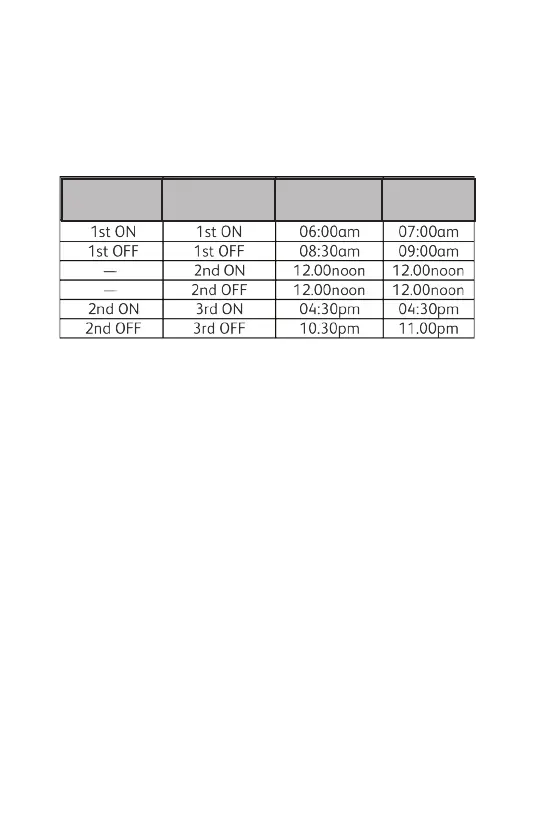
The Factory-Set Programme
This is the factory-set programme built into the unit. If the user
changes from the factory-set programme and wishes to return to it,
pressing the reset buon with a non metallic pointed tool will return
the unit to the factory-set programme. NB. Every me the reset is
pressed, the me and date must be set again (page 8).
If the unit is installed as a 24 hour programmer the built in
programme will be the same for each day (i.e. Sat-Sun be same as
Mon-Fri above).
Changing The Programme (refer to Fig.1, Page 4)
For 7 Day Programmer Opon - the inial programme displayed will
be for Monday. You can go to any day of the week by pressing the
DAY buon repeatedly. The COPY buon will copy the current
programme onto the next day. NB. It is not possible to copy Sunday
to Monday.
For 5/2 Day Programmer Opon - the inial programme displayed
will be for Monday - Friday. Press the DAY buon for Saturday -
Sunday programme. The COPY buon will copy the current
programme onto the next day group. NB. It is not possible to copy
Saturday-Sunday programme to Monday-Friday programme.
For 24 Hour Programmer Opon - the built in programme will be
the same for each day. The COPY & DAY buons have no effect if
installed as a 24 hour programmer.
3
To change the Central Heang mes
1. Press SET buon (1) unl first radiator icon (2) flashes in the
display and 1 ON (3) appears.
Configuraon
2PU & 2Gr
Configuraon
3PU & 3Gr
Mon-Fri Sat-Sun


 To Next Page