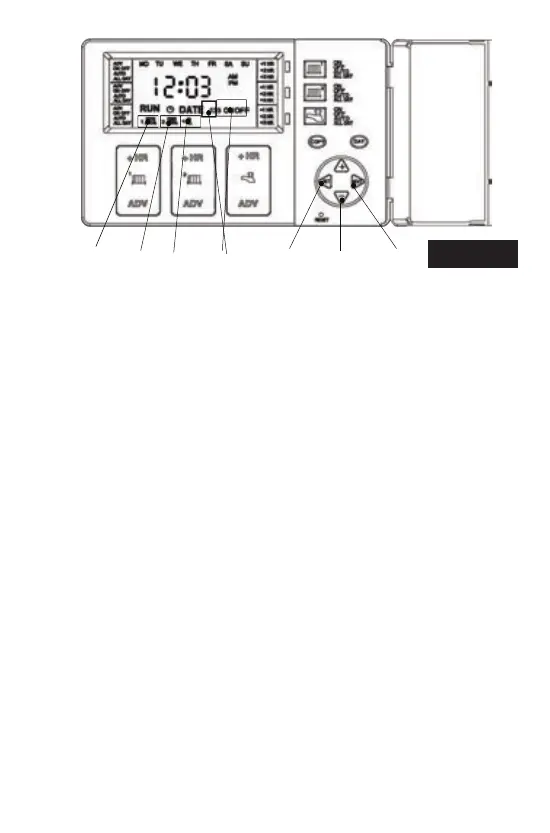
2. Press the +/- buons (4) to alter the ON me.
3. Press the NEXT buon (5), and the display will now show 1 OFF
(3).
4. Press the +/- buons (4) to alter the OFF me.
5. Press the NEXT buon (5) to access remaining ON/OFF periods
and alter in same manner as above.
6. Press Set Buon (1) to access Heang Zone 2. The second radiator
icon (6) will flash. Repeat proceedures for CH1 if you wish to change
CH2 programme mes.
Programming the Unit
(1)(3)(6) (7) (5)(2)
(4)
Fig. 1
4
Press SET buon (1) unl tap icon (7) flashes in the display and 1 ON
(3) appears. This indicates the me shown on the display is the first
ON me. Proceed in same manner as ‘To change the Central Heang
mes’ above.
NB: Programming is in 10 minute segments. The programme day is
from 03:00am to 02:50am the next day. If a programme is required
to run from 1.00 am to 8.00 am, 2 programmes must be used (1.00
am-2.50 am and 3.00 am-8.00 am). NB: The unit will automacally
return to RUN mode if a period of 5 minutes passes without any
buons being pressed.
To change Hot Water Times


 To Next Page