Programming
Program Schedules
Your ESRTP4RFW has been designed to be a
simple to use thermostat, requiring minimal
user intervention with a pre-programmed
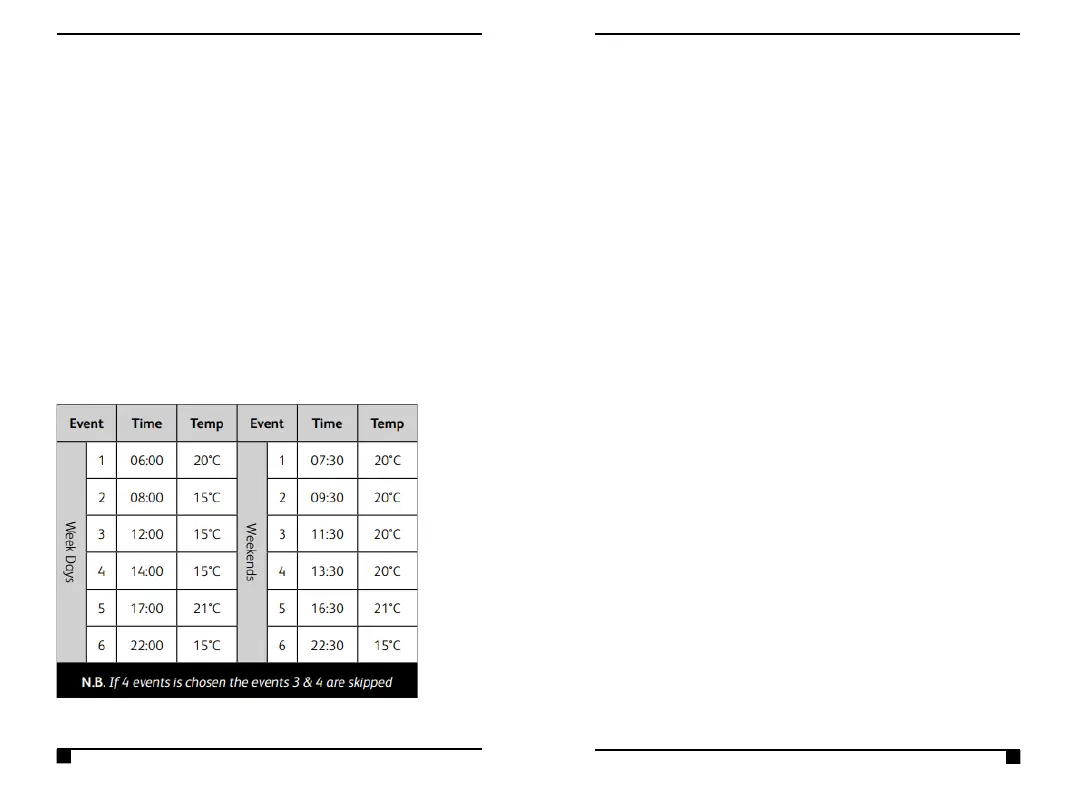
heating profile. The pre-set heating times &
temperatures will suit most people, (see table
below). To accept the factory pre-set profile,
tap the MODE button until you see AUTO on
the display. This will run the pre-set programs.
Set Program Schedule (5-2Day, 7Day,
24Hour)
1. Tap the PROG button.
2. Use the +/- buttons to choose from the
following:
• 5-2Day: One set of programs can
be set for weekdays, with a
different set of programs for
weekends.
• 24Hour: Every day will run the
same programs.
• 7Day: Every day can run a different
program. Each day MUST be
programmed separately.
3. Use the ►►button to move on to
programming.
Choose 4 Or 6 Daily Programs
Your thermostat will be defaulted to use 4 daily
programs, this would usually be used as 2 ON
programs & 2 reduced temperature (SETBACK)



 To Next Page