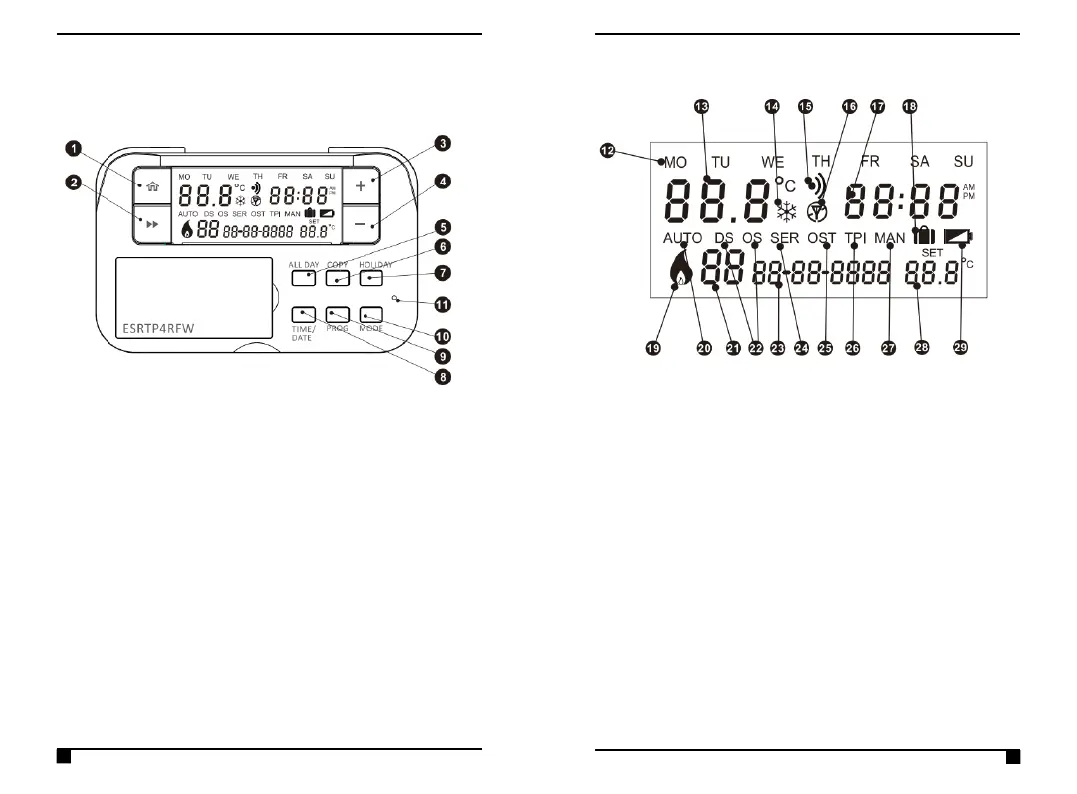
Quick Operating Guide
1 HOME – Takes you back to your HOME screen
2 NEXT – Moves you to the next option within a
function
3 PLUS – Temporary override/adjust settings
4 MINUS -Temporary override/adjust settings
5 ALL DAY – Set All Day Mode
6 COPY – Copy programs from 1 day to another (only in
7Day schedule)
7 HOLIDAY – Set Holiday Mode
8 TIME & DATE - Set the current time & date
9 PROG – Set programs
10 MODE – Choose between Auto Mode, Manual Mode
or Off
11 RESET
12 Day Display
13 Room Temperature
14 Frost Protection (Thermostat is OFF)
15 Wi-Fi Connection State (When paired with ESWIFIHUB)
16 RF Connection State
17 Time Display
18 Holiday Mode
19 Flame Icon (When calling for heat)
20 Auto Mode is selected
21 Current running program number
22 Optimum/Delayed Start is active
23 Date Display
24 Annual Service is due
25 Optimum Stop is active
26 TPI is active
27 Manual Mode is selected
28 SET temperature
29 Low battery warning



 To Next Page