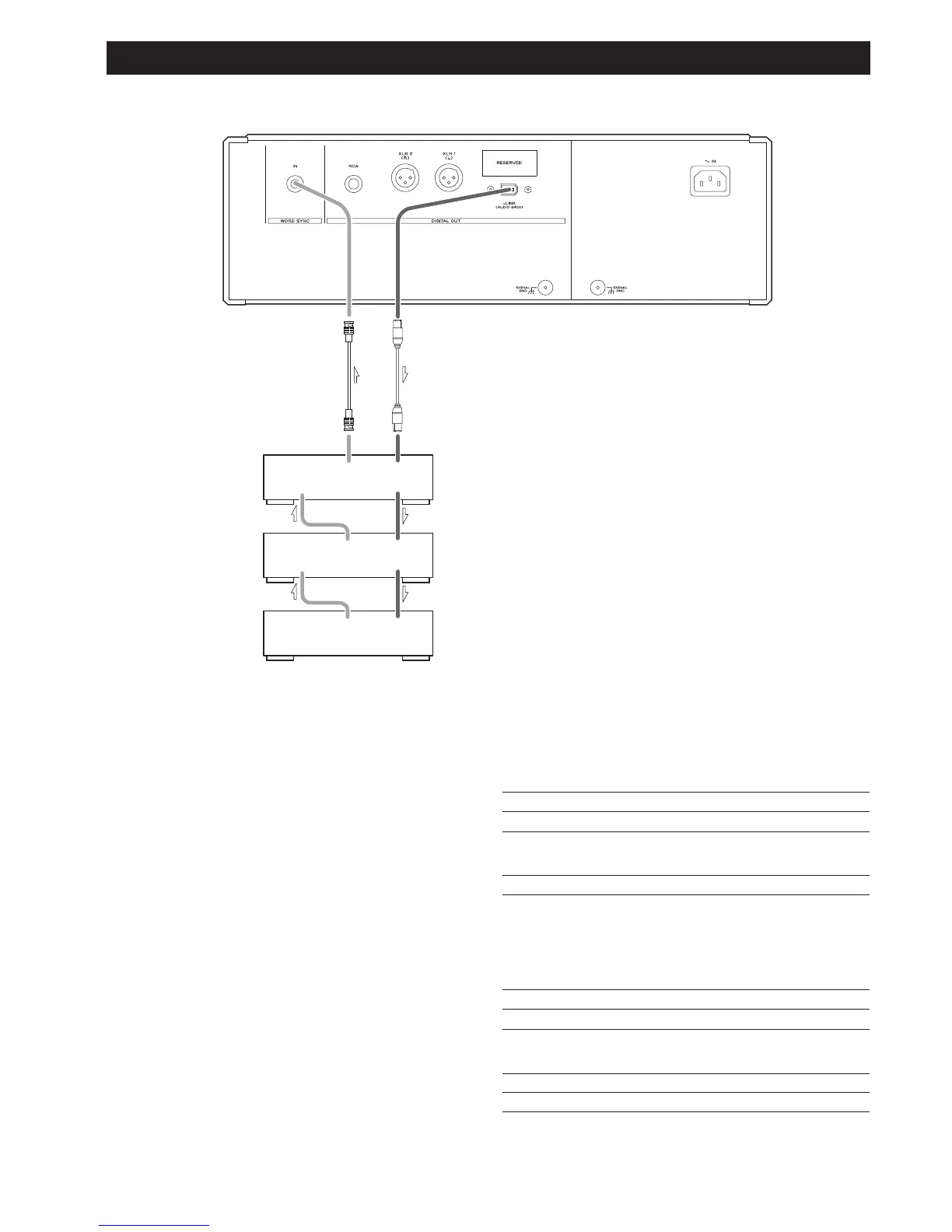
Three D-03 units are required to play multi-channel sound
from a Super Audio CD without mixing it down to stereo.
First, connect the i.LINK (AUDIO) terminal on the P-03 to
the D-03 i.LINK (AUDIO) terminal. Then connect the other
i.LINK (AUDIO) terminal on the D-03 to the next D-03 unit.
Daisy chain the three units similarly (in random order).
Connect the word sync terminals as shown in the figure (in
random order).
When connecting clock generator G-0/G-0s to the P-03, connect
the WORD CLOCK OUT terminals to the WORD SYNC IN on the
P-03.
Setting of the P-03
Digital Output setting i.LINK (see pages 16-17)
WORD button
ON
Setting of the D-03
INPUT button i.LINK
WORD button One of the D-03 that outputs word
synchronization signals: “OUT”
The others: “IN”
When the G-0 is connected, set all
the D-03s to “IN”.
W_OUT setting 176.4 or 88.2
CH_SEL setting respective channels
Setting of the G-0/G-0s
Frequency change button (A, B or C) 176.4 kHz or 88.2 kHz
FREQUENCY MODE button 44.1kHz
BNC coaxial digital cable
i.LINK cable



 To Next Page