PROGRAMMING Page 21
Advanced programming
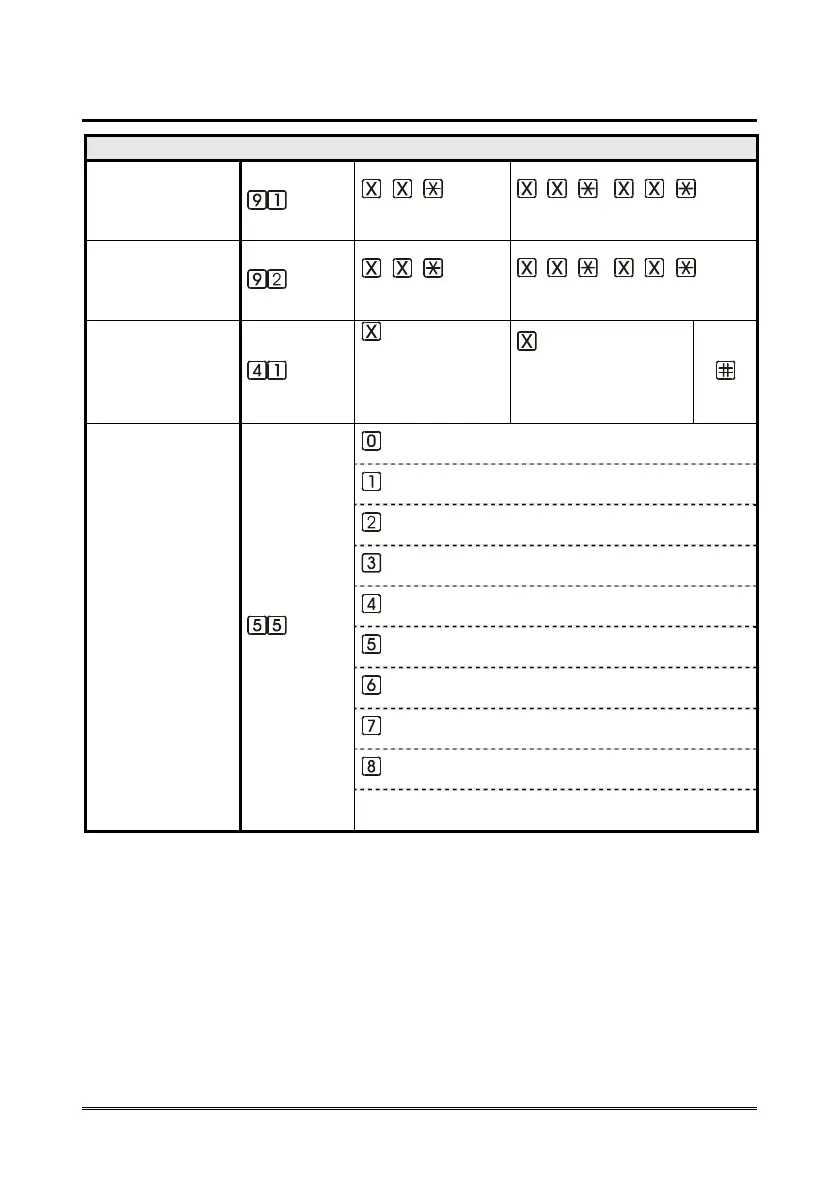
ADVANCED PROGRAMMING
CHANGE THE
INSTALLER
PASSWORD “0”
(INST)
… [ ]
(old)
.. [ ] .. [ ]
(new) (new)
CHANGE THE
OPERATOR
PASSWORD “1”
(INST)
… [ ]
(old)
.. [ ] .. [ ]
(new) (new)
INPUTS
NORMALLY
OPEN/CLOSED
(INST)
input
(1=AL1
2=AL2
3=IN1)
type
(0=normally closed
1=normally open)
INPUTS PRESET *
(INST)
* for the complete
configuration of the
inputs, please refer
to the Expert
Programming Guide
AL2=alarm input / IN1=filter input
AL2=auxiliary input / IN1=filter input
AL2=alarm input / IN1=gong input
AL2=auxiliary input / IN1=gong input
AL2=reset input / IN1=filter input
AL2=reset input / IN1=gong input
AL2=reset input / IN1=alarm input
AL2=reset input / IN1=auxiliary input
AL2=alarm input / IN1=alarm input
in listening mode the value 9 indicates inputs set with
the code 390



 To Next Page