23
Menu Adjustments
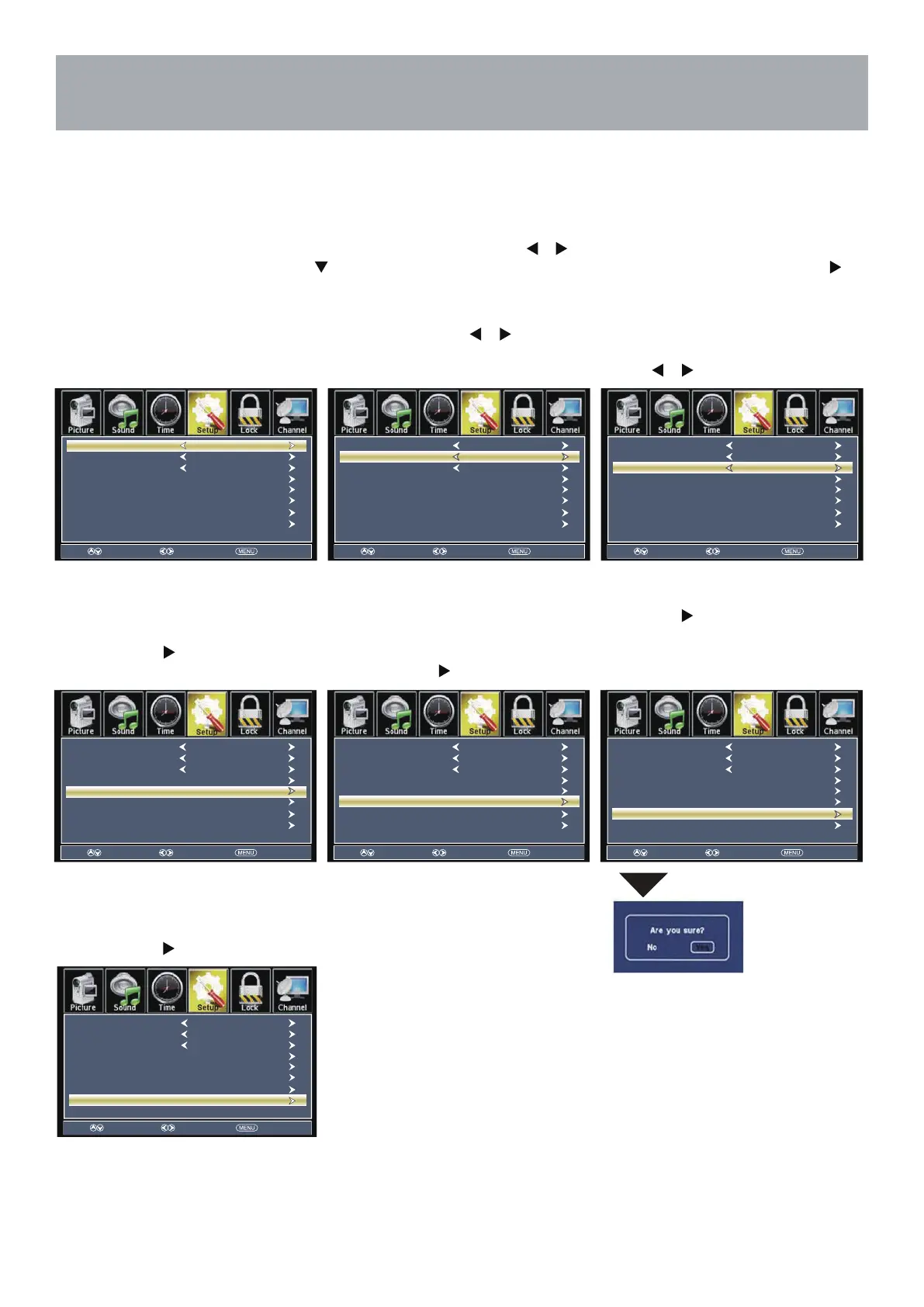
In the Setup menu you may change the initial set up of preferences that include settings for language, menu display,
computer monitoring,closed captions, enhancement of black detail in the picture and resetting your TV back to its fac-
tory default status.
Setup Settings
NOTE: Closed Caption and Advanced are features described on the following pages.
How to Navigate:
Press the MENU button on the remote control. Navigate using arrow
buttons to select Setup. Gain access to
display options by pressing the down arrow button to highlight Menu Language or other options, then press
arrow button on your remote to select.
Create labels for the devices
connected to your TV.
Press ENTER / button to enter.
Set the parameter of audio only,no
signal power off and no operation
power off.
Press ENTER / button to enter.
Press the arrow button to
automatically reset all adjustments
back to their original factory settings.
tluafeD erotseR •sgnitteS rehtO •lebaL tupnI •
Other languages include English,
Français, Español.
Navigate using the arrow but-
tons to turn 0,25%,50%,75%,100% the
translucent effect of the User menu.
Adjust the duration of the
OSD(on screen display)menu.
Press button to select.
tuO emiT DSO •tnerapsnarT •segaugnaL uneM •
Select Move Exit
Menu Language
Transparent
Closed Caption
OSD Timeout
Other Settings
Input Label
Restore Default
Setup Wizard
English
25%
30Sec.
Select Move Exit
Menu Language
Transparent
Closed Caption
OSD Timeout
Other Settings
Input Label
Restore Default
Setup Wizard
English
25%
30Sec.
Select Move Exit
Menu Language
Transparent
Closed Caption
OSD Timeout
Other Settings
Input Label
Restore Default
Setup Wizard
English
25%
30Sec.
Select Move Exit
Menu Language
Transparent
Closed Caption
OSD Timeout
Other Settings
Input Label
Restore Default
Setup Wizard
English
25%
30Sec.
Select Move Exit
Menu Language
Transparent
Closed Caption
OSD Timeout
Other Settings
Input Label
Restore Default
Setup Wizard
English
25%
30Sec.
Select Move Exit
Menu Language
Transparent
Closed Caption
OSD Timeout
Other Settings
Input Label
Restore Default
Setup Wizard
English
25%
30Sec.
Select Move Exit
Menu Language
Transparent
Closed Caption
OSD Timeout
Other Settings
Input Label
Restore Default
Setup Wizard
English
25%
30Sec.
• Setup Wizard
Set the first time installation.
Press ENTER / button to enter.



 To Next Page