10
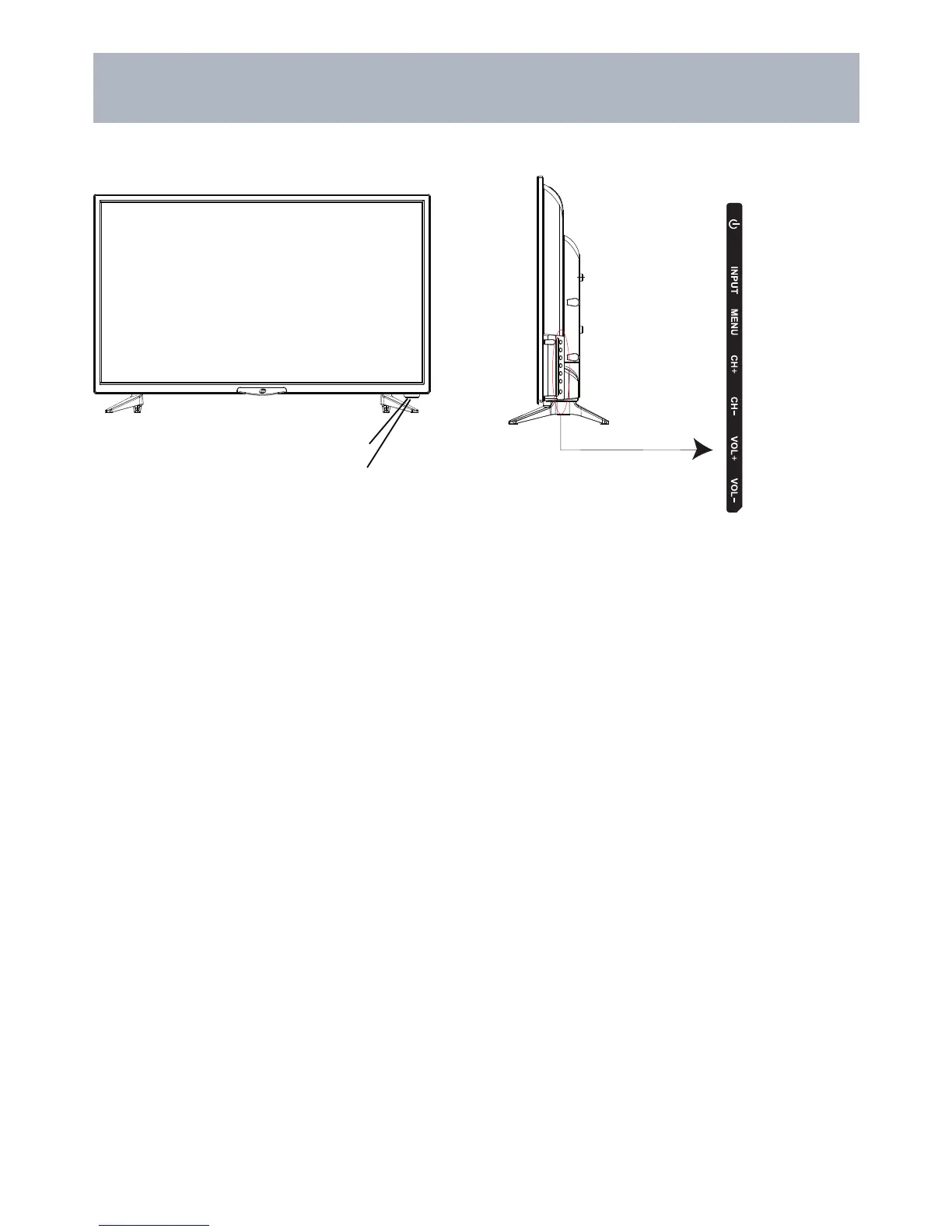
TV Overview
Front Panel
IR Receiver
n
o
p
q
r
A Green/Blue light illuminates When
the television power is on.
2. INPUT - After connecting your DVD, cable box, etc. select the appropriate input source to view. Press the
INPUT button to display the input options. Press the CH+ / CH- buttons to highlight the input source and
press the VOL+ button to select.
3. MENU - Press the MENU button to display. Press VOL+ to select from the 6 menu options available.
Press the CH+ / CH- buttons to select a feature from the selected menu then press the VOL+/VOL- buttons
to adjust the volume settings.
4. Channel (-CH+) - Press the CH- / CH+ buttons to select a channel in the TV mode.
5. Volume (-VOL+) - Press the VOL- / VOL+ buttons to adjust the volume up or down.
1. POWER - Press the POWER button to turn the TV ON/ OFF (standby). The screen image will
appear within a few seconds, and the LED will turn on.


 To Next Page