24
Menu Adjustments
CEC
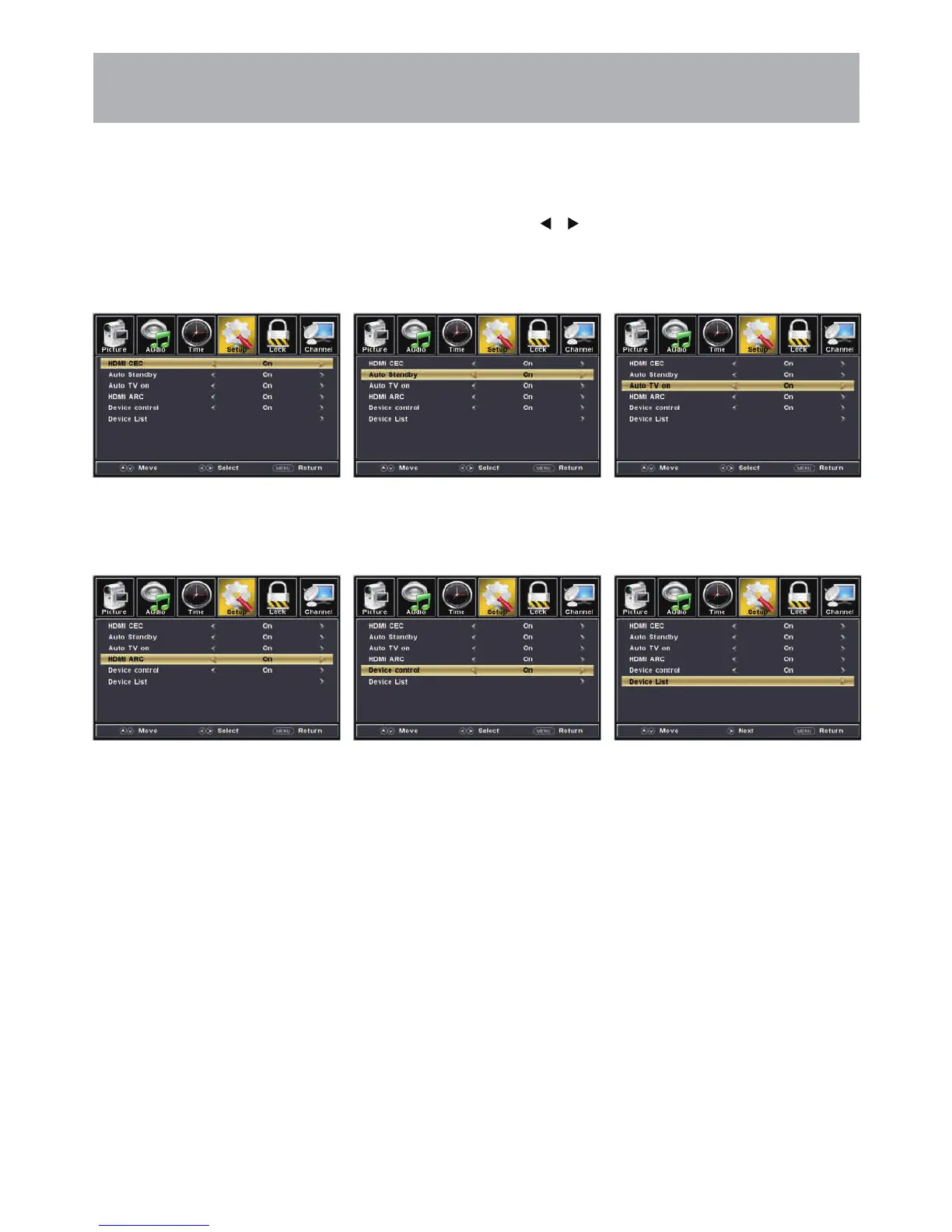
The CEC menu includes HDMI CEC \ Auto Standby \ Auto TV on \ HDMI ARC \ Device control \ Device List.
How to Navigate:
Press the MENU button on the remote control. Navigate using arrow buttons to select Setup
• To turn the HDMI CEC option
On/Off use the pq buttons to
highlight HDMI CEC then press t u.
• Auto Standby: the TV will turn
Off when there is No Signal on
the TV for several minutes.
• Auto TV On: TV will automatically
turn On when the connected CEC
device is turned On.
• Turn HDMI ARC ON if you want to
use the ARC function with a connected
5.1/7.1 Home Theater System.
• Device Control: allows for a
connected CEC device to be
controlled by the TV remote.
Note: When adjustments are completed, you may select another menu by pressing the Menu button.
• Device List: displays a list of
HDMI CEC devices currently
connected to the TV.
• Note: refer to the user manual of your
Home Theater System for compatibility,
instructions, and connections needed
to use the HDMI ARC feature.
• Note: refer to the user manual of your
connected CEC device for compatibility,
instructions, and connections needed
to use the HDMI CEC feature.


 To Next Page