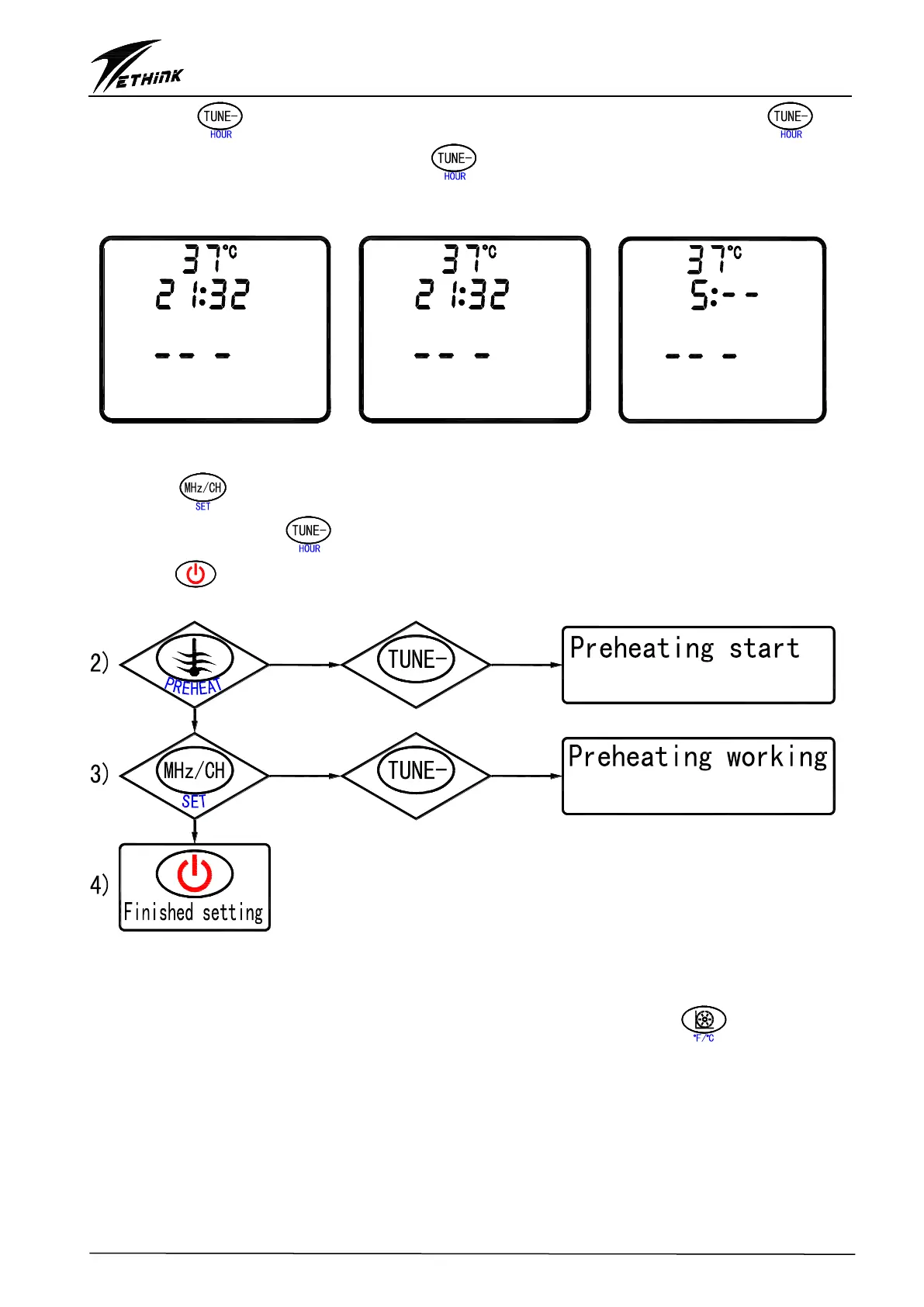
time, press “ ” key to change the hours of preheating start time. Each press of “ ”key
will add 1 hour, when the user presses “ ” key and holds it, the hour will continuously
increase. The adjustment range is 0~23.
Fig. 9:Preheating can’t Fig. 10:Preheating can Fig. 11 The last time setting
be set up be set up of preheating
3) Press “ ” key to set up the last time of circulation cleaning(Fig. 11), the last time is not
flashing. Each press of “ ”key will add 1 hour, the longest last time range is 1-19hours.
4) Press “ ” to confirm all the settings and exit circulation filtration set up, all the settings will
save in memory even the system is powered off.
U
O
H
R
U
O
H
R
time setting
time setting
4. The switch between Celsius and Fahrenheit
4.1 When A4=OFF, the system can only display temperature in Celsius
4.2 When A4=ON, the temperature display will be controlled by the key “ ”, the user can
switch the temperature display between Celsius and Fahrenheit.


 To Next Page