28
Note the wide/narrow diagram in the display (36).
AM/FM – The MUSIC/WIDE position creates a ‘brighter’ music sound.
The NEWS/NARROW position creates a less ‘bright’ sound.
Shortwave – The MUSIC/WIDE position creates the best audio del-
ity. The NEWS/NARROW position helps to minimize interference from
other stations.
This socket provides an industry standard, xed level audio output
source for safely routing the E5’s audio to the line-in socket of a
stereo system or recording device. Follow your external device’s
line-input instructions. The E5’s volume control has no effect on this
output.
Earphones/headphones with a 1/8 inch stereo plug can be used. Plug
them into the earphone socket (insert symbol) on the left side of the
radio. Turn the volume down before wearing the earphones, then
turn up the volume to your liking.
11 MUSIC/WIDE AND NEWS/NARROW SWITH (41)
13 EARPHONE SOCKET (47) AND
USING EARPHONES
12 LINE-OUT SOCKET (43)
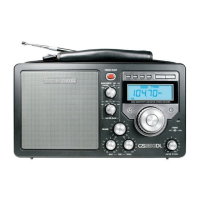
E5 OWNER’S MANUAL


 To Next Page