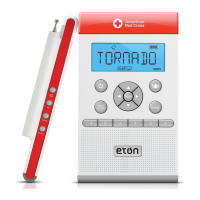
ZONEGUARD+ OWNER’S MANUAL
11
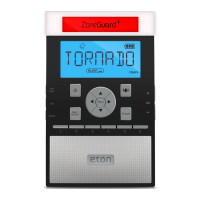
SET ALERT MODE
1. Press <MENU>, then press < > or < > to select
<ALERT–SIREN/VOICE> mode.
[SIREN]: The alarm will beep for about 5 minutes and the
LCD will display the message.
[VOICE]: The alarm will beep for a few seconds and the
LCD will display the message.
2. Press <
> or < >, when the <SIREN/VOICE> ashes,
press <
> or < > to select.
3. Press <MENU> twice to conrm and exit.
When the alert sounds:
1. Press <ALERT-ON/OFF> to turn off the beep.
2. Press <
> or < > to read the alert message in the
display. If there is no weather information, the LCD will
display NO -MESSAGE.
KNOW YOUR LIGHTS
When you receive a S.A.M.E. notication, a red, orange or
green light appears on the ZoneGuard+, representing a
WARNING, WATCH or ADVISORY alert. The alert message
will simultaneously scroll across the display.
WARNING (Red Light)
A WARNING is issued when a hazardous weather or
hydrologic event is occurring, imminent or likely. A
WARNING means weather conditions pose a threat to life
or property. People in the path of the storm need to take
protective action.
WATCH (Orange Light)
A WATCH is used when the risk of a hazardous weather
or hydrologic event has increased signicantly, but
its occurrence, location or timing is still uncertain. It is
intended to provide enough lead time so those who need
to set their plans in motion can do so. A WATCH means that
hazardous weather is possible. People should have a plan
of action in case a storm threatens and they should listen
for later information and possible warnings especially when
planning travel or outdoor activities.


 To Next Page