EasyManua.ls Logo

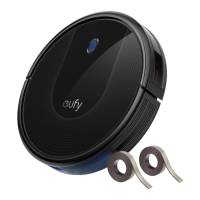
EUFY RoboVac 30 - User Manual

EUFY RoboVac 30
80 pages
Print Icon
To Next Page IconTo Next Page
Loading...
T2116 51005001413 V02
Bedienungsanleitung l Manual del propietario
Manuel d'utilisation l Guida di Utilizzo l Handleiding
Owner’s Manual
RoboVac 30 (T2116)

Table of Contents

Questions and Answers

  • D
    Dr. Carolyn GarciaAug 18, 2025
    How to fix EUFY RoboVac 30 Vacuum Cleaner suction fan stuck?
    • D
      Dennis Harris DDSAug 19, 2025
      If the suction fan on your EUFY Vacuum Cleaner is stuck, turn off the Vacuum Cleaner, then remove and empty the dust collector. Make sure the suction inlet is not blocked by any hair or debris.
  • R
    Raymond SanchezAug 21, 2025
    Why is the suction power weak on my EUFY RoboVac 30?
    • M
      Mrs. Denise Roth PhDAug 21, 2025
      If your EUFY Vacuum Cleaner has weak suction power, check for any obstructions blocking the suction inlet. Also, empty the dust collector and clean the filters with a vacuum cleaner or a cleaning brush. If the filters are wet, air-dry them completely before use.
  • K
    Kenneth MasonAug 23, 2025
    What to do if my EUFY Vacuum Cleaner stops working suddenly?
    • R
      Rachel CollierAug 23, 2025
      If your EUFY Vacuum Cleaner suddenly stops working, first check if it's trapped or stuck on an obstacle. Then, check if the battery level is too low. If the problem persists, turn the main power switch off, wait for 2 seconds, and then turn it back on.
  • K
    kimberlyrobinsonAug 26, 2025
    What to do if my EUFY Vacuum Cleaner remote control does not work?
    • M
      Mark FigueroaAug 26, 2025
      If the remote control for your EUFY Vacuum Cleaner isn't working, replace the batteries. Also, ensure that the Vacuum Cleaner is turned on and fully charged.
  • C
    Christopher FisherAug 28, 2025
    How to fix EUFY Vacuum Cleaner not returning to Charging Base?
    • T
      Taylor Williams MDAug 28, 2025
      To ensure your EUFY Vacuum Cleaner returns to the Charging Base, remove objects within 3 ft/1 m to the left and right side and within 6 ft/2 m of the front of the Charging Base. When the Vacuum Cleaner is near the Charging Base, it will return more quickly. Clean the charging contact pins.
  • S
    Shelly MaloneAug 30, 2025
    What to do if my EUFY Vacuum Cleaner cannot be charged?
    • M
      Mark NelsonAug 30, 2025
      If your EUFY Vacuum Cleaner cannot be charged, check if the indicator on the Charging Base lights up. Dust off the charging contact pins with a dry cloth. Check if you can hear a beep when the Vacuum Cleaner is docked onto the Charging Base.
  • D
    David HayesSep 1, 2025
    Why my EUFY RoboVac 30 Vacuum Cleaner cannot be activated?
    • W
      William ReyesSep 1, 2025
      If your EUFY Vacuum Cleaner cannot be activated, ensure the main power switch is in the ON position and that the battery is fully charged. Replace the batteries in the remote control and make sure the remote control is within 16 ft/5 m of the Vacuum Cleaner. If you still have trouble, turn off the main power switch and then turn it back on.
  • M
    Michael ByrdSep 4, 2025
    How to fix abnormal movements of EUFY Vacuum Cleaner?
    • D
      Deborah LaneSep 4, 2025
      If your EUFY Vacuum Cleaner's movements are abnormal, carefully clean the sensors with a dry cloth. You can also try restarting the Vacuum Cleaner by turning the power switch off and on.
  • N
    Natalie MitchellSep 6, 2025
    How to fix EUFY RoboVac 30 rolling brush that does not rotate?
    • R
      Richard MayerSep 6, 2025
      If the rolling brush on your EUFY Vacuum Cleaner isn't rotating, clean the rolling brush. Also, check if the rolling brush and brush guard have been installed properly.
  • T
    Tyler RuizSep 8, 2025
    How to fix EUFY Vacuum Cleaner rolling brush stuck?
    • J
      Jonathan LindseySep 8, 2025
      If the rolling brush of your EUFY Vacuum Cleaner is stuck, turn off the Vacuum Cleaner and remove any hair or debris from the rolling brush.

Summary

Important Safety Instructions

Using Your RoboVac

Important Tips Before Use

Provides crucial advice and precautions to follow before operating the RoboVac.

Charge Your RoboVac

Start;Stop Cleaning

Select a Cleaning Mode

Auto Cleaning

Details the automatic cleaning mode that optimizes cleaning paths.

Spot Cleaning

Describes the mode for intensive cleaning of a specific small area.

Edge Cleaning

Covers the mode designed for thorough cleaning along walls and edges.

Use the Boundary Strip

Set Time and Scheduled Cleaning

Cleaning and Maintenance

Clean the Dust Collector and Filters

Clean the Rolling Brush

Clean the Side Brushes

Replace the Side Brushes

Clean the Sensors and Charging Pins

Clean the Swivel Wheel

Troubleshooting

Error Tones

Explains the meaning of different beep patterns and red indicator lights.

EUFY RoboVac 30 Specifications

General IconGeneral
Suction Power1500 Pa
Battery LifeUp to 100 minutes
Dustbin Capacity0.6 L
Boundary StripsYes
Filter TypeHigh-Performance Filter
Dimensions12.8 x 12.8 x 2.85 inches
Battery Capacity2600 mAh
Noise Level55 dB
Wi-Fi ConnectivityNo
App ControlNo
Voice ControlNo
Auto ChargingYes
Cleaning ModesAuto, Spot, Edge, Single Room
Climbing Ability0.63 inches
Weight2.7 kg
Charging Time300-360 minutes
FeaturesDrop-sensing

Related product manuals