EasyManua.ls Logo

EUFY RoboVac G20 - User Manual

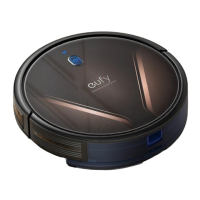
EUFY RoboVac G20
40 pages
Print Icon
To Next Page IconTo Next Page
Loading...
RoboVac G20
Owner’s Manual
T2257 51005003140 V01

Questions and Answers

  • M
    michael36Aug 17, 2025
    Why won't my EUFY RoboVac G20 Vacuum Cleaner RoboVac connect to Wi-Fi?
    • C
      Crystal HumphreyAug 17, 2025
      If your EUFY Vacuum Cleaner RoboVac is having trouble connecting to Wi-Fi, ensure that you've entered the correct Wi-Fi password. Also, verify that your RoboVac, router, and mobile phone are close enough to ensure a strong signal. Your Wi-Fi router should support the 2.4GHz and 802.11b/g/n bands, as the 5GHz band is not supported.
  • M
    Mary GarciaAug 20, 2025
    What to do if EUFY RoboVac G20 RoboVac cannot be charged?
    • M
      Maria MasonAug 20, 2025
      If your EUFY Vacuum Cleaner RoboVac isn't charging, first check if the indicator on the Charging Base lights up. If it doesn't, reconnect the adapter to the Charging Base and try a different power outlet. Dust off the charging contact pins with a dry cloth and check if you can hear a beep when RoboVac is docked onto the Charging Base.
  • K
    Keith MeyersAug 22, 2025
    Why is the suction power weak on my EUFY RoboVac G20 Vacuum Cleaner?
    • B
      Brian WoodAug 22, 2025
      If you notice weak suction power on your EUFY Vacuum Cleaner, start by checking the suction inlet for any obstructions. Empty the dust collector, and inspect the filter to see if it's wet from water or other liquids. If the filter is wet, air-dry it completely before using the vacuum again.
  • S
    Shannon HansonAug 26, 2025
    What to do if my EUFY RoboVac G20 RoboVac stops working suddenly?
    • M
      Maureen MartinAug 26, 2025
      If your EUFY Vacuum Cleaner RoboVac suddenly stops working, check if it's trapped or stuck on an obstacle. Also, check the battery level to ensure it's not too low. If problems persist, turn off the main power switch, wait 2 seconds, and turn it back on. Finally, check for any voice prompts or LED indicators; refer to the “Voice Alert” section in this manual.
  • M
    Michael KlineAug 28, 2025
    Why EUFY RoboVac G20 Vacuum Cleaner RoboVac cannot return to the Charging Base?
    • S
      Scott RodriguezAug 28, 2025
      If your EUFY Vacuum Cleaner RoboVac is unable to return to the Charging Base, remove any objects within 3 ft/1 m to the left and right and within 6 ft/2 m of the front of the Charging Base. Check if RoboVac is stuck on any objects, and clean the charging contact pins.
  • M
    mendozaericAug 30, 2025
    Why can't I control my EUFY Vacuum Cleaner with Amazon Alexa?
    • H
      harristraceyAug 30, 2025
      If you're having trouble controlling your EUFY Vacuum Cleaner with Amazon Alexa, check for Internet connection problems. Ensure you've installed the Amazon Alexa app on your smart device and enabled the 'EufyHome - RoboVac' Skill. Also, verify that you have a EufyHome account and have connected to RoboVac, and make sure you're using the correct Alexa voice commands.
  • V
    vrogersSep 2, 2025
    What to do if EUFY RoboVac G20 RoboVac cannot be activated?
    • A
      Anna WebbSep 3, 2025
      If your EUFY Vacuum Cleaner RoboVac cannot be activated, make sure the main power switch is in the ON position and that the battery is fully charged. If you're still experiencing issues, try turning the main power switch off and then back on.
  • E
    Elizabeth ClarkSep 5, 2025
    Why are the movements of my EUFY RoboVac G20 Vacuum Cleaner RoboVac abnormal?
    • E
      Evan TurnerSep 5, 2025
      If your EUFY Vacuum Cleaner RoboVac's movements or travel path seem abnormal, carefully clean the sensors with a dry cloth. You can also try restarting RoboVac by turning the power switch off and on.
  • J
    Jennifer WarnerSep 8, 2025
    Why is the cleaning time shorter for my EUFY Vacuum Cleaner RoboVac?
    • W
      William VillarrealSep 8, 2025
      If your EUFY Vacuum Cleaner RoboVac's cleaning time has become shorter, make sure RoboVac is fully charged (indicated by a solid blue LED light) before cleaning. The cleaning time is affected by the suction mode and the types of floors or rugs being cleaned. Check if RoboVac has alerted you with any voice prompts or LED indicators; refer to the “Voice Alert” section in this manual.
  • C
    Cathy SpearsSep 12, 2025
    What to do if water does not come out during mopping with EUFY RoboVac G20 Vacuum Cleaner?
    • M
      Michelle CarrilloSep 12, 2025
      If water isn't coming out during mopping with your EUFY Vacuum Cleaner, ensure there's enough water in the water tank and that the water tank and mopping cloth are properly installed. Check if the water outlets are blocked; if so, replace the filter elements.

EUFY RoboVac G20 Specifications

General IconGeneral
Suction Power2500 Pa
Noise Level55 dB
Dustbin Capacity0.6 L
Wi-Fi ConnectivityYes
Cleaning ModesAuto, Spot, Edge, Single Room
Boundary StripsNo
Height7.2 cm
Control MethodApp, Voice
Voice ControlAmazon Alexa, Google Assistant
Dimensions12.8 x 12.8 x 3.1 inches
Battery LifeUp to 100 minutes
RuntimeUp to 100 minutes

Related product manuals