Dustbin/Water tank maintenance (clean as needed)
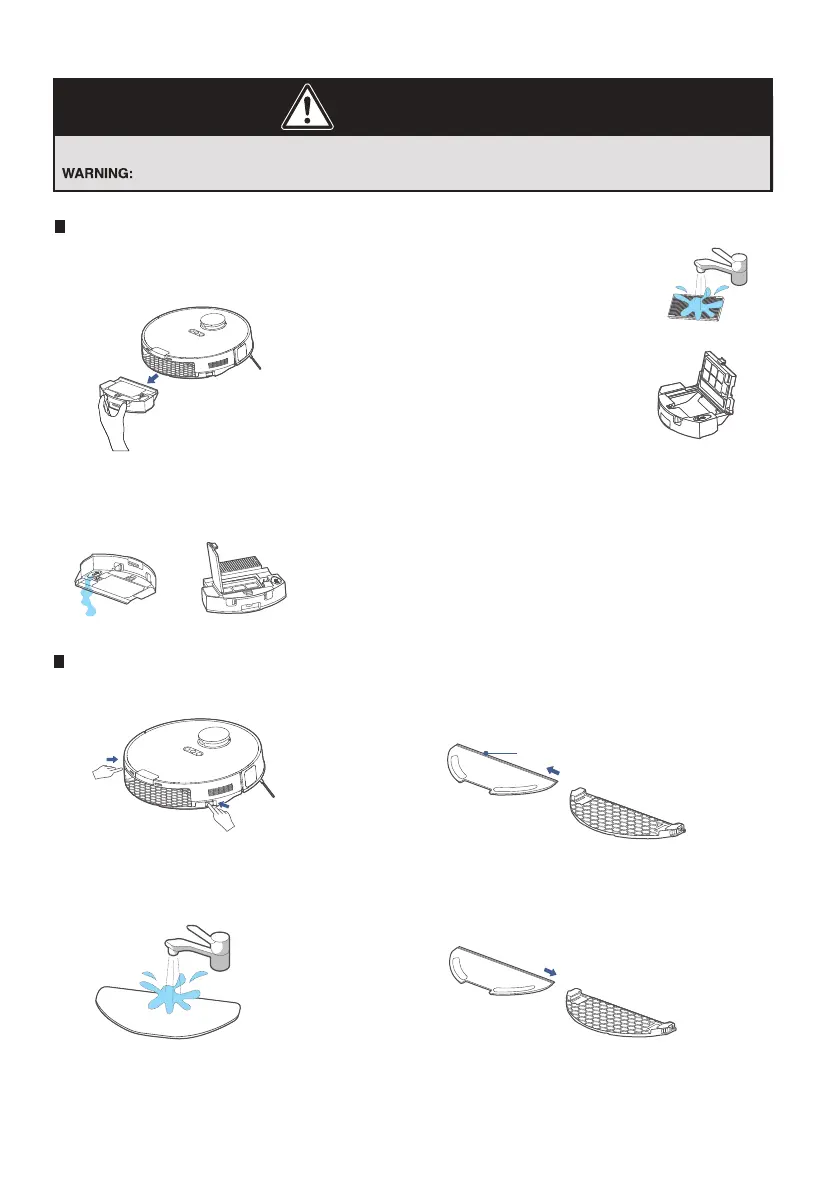
Take out the dustbin:
Press the dustbin release button
as shown and take out the dustbin.
1.
Remove debris by tapping the
filter against your garbage bin.
You can clean the dustbin, the
filter and filter mesh with water,
but remember to dry them
THOROUGHLY before reinserting
them into the robotic vacuum (Do
not clean the filter elements with
detergents).
3.
Reinsert the dustbin into the robotic vacuum. It is
recommended to clean the filter elements
every week and replace them every 1-3 months.
4.
Moving parts! Recharge robotic vacuum after each use.
Never operate robotic vacuum without all filters, filter screen and dustbin in proper position.
CAUTION
How to maintain your robotic vacuum
Open the lid of the water tank
and clean out the remaining water.
Open the lid of the dustbin and
take out the filter.
2.
Cleaning the mop assembly
Release the mop assembly and clean it.1.
Wash the mopping cloth with water
and dry it.
3.
Place the cleaned mopping cloth
back to the mop holder and re-install
the mop assembly to the robotic vacuum.
4.Remove the mopping cloth from
the mop holder.
2.
Push/Pull Slot
14
Eureka Customer Service HELPLINE 1-800-282-2886



 To Next Page