12
After Sales Support
(AU) 1300 886 649 (NZ) 0800 836 761 | info@tempo.org
Other Useful Information (Cont.)
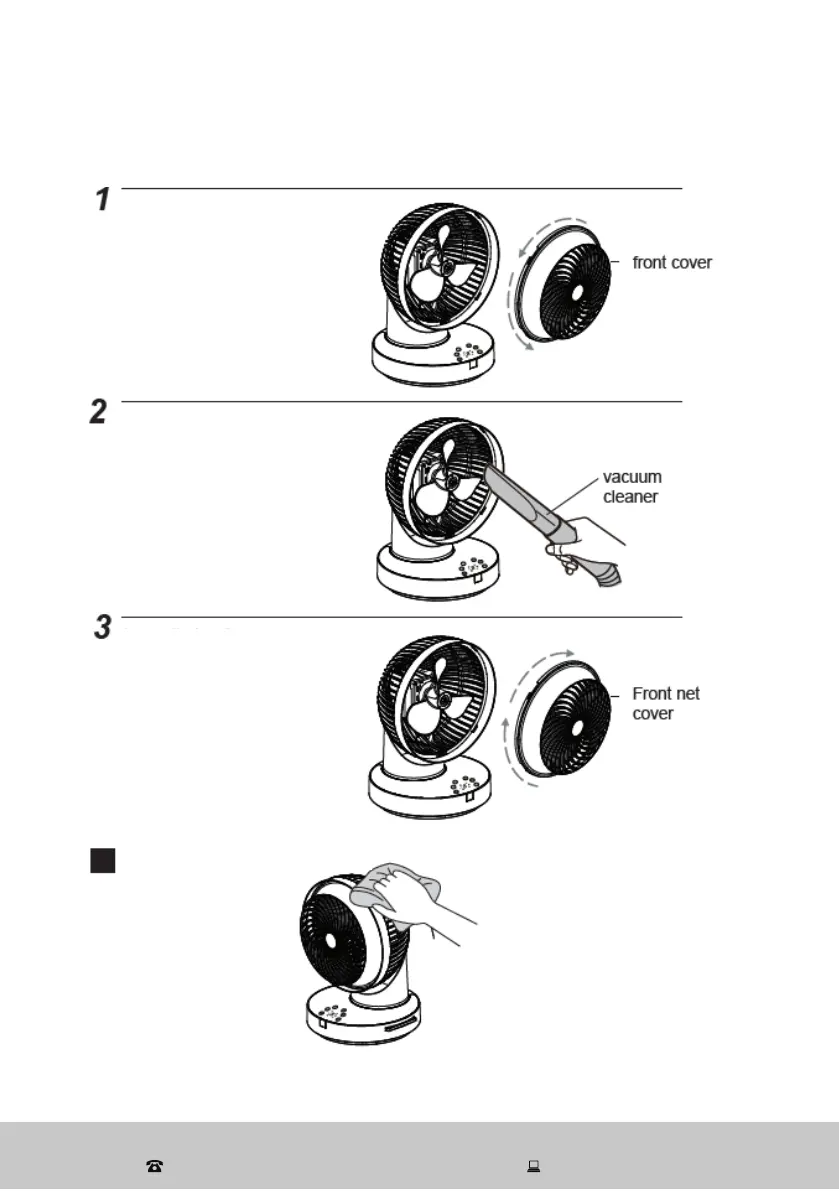
Blade cleaning
Remove the front cover
Unscrew the screw at the
front cover (guard). Remove
the front cover, turning it in
anticlockwise direction.
Cleaning
Use a vacuum cleaner
crevice nozzle to remove
dust. Use a soft cloth to
wipe the blade and areas
you cannot reach with the
vacuum cleaner.
Reinstall the front cover
Make sure the lug of the
front cover (guard) locks the
rear cover, then screw the
two pieces together.
Cleaning the housing
Use a soft, lint-
free cloth to wipe
the outside of the
housing.


 To Next Page