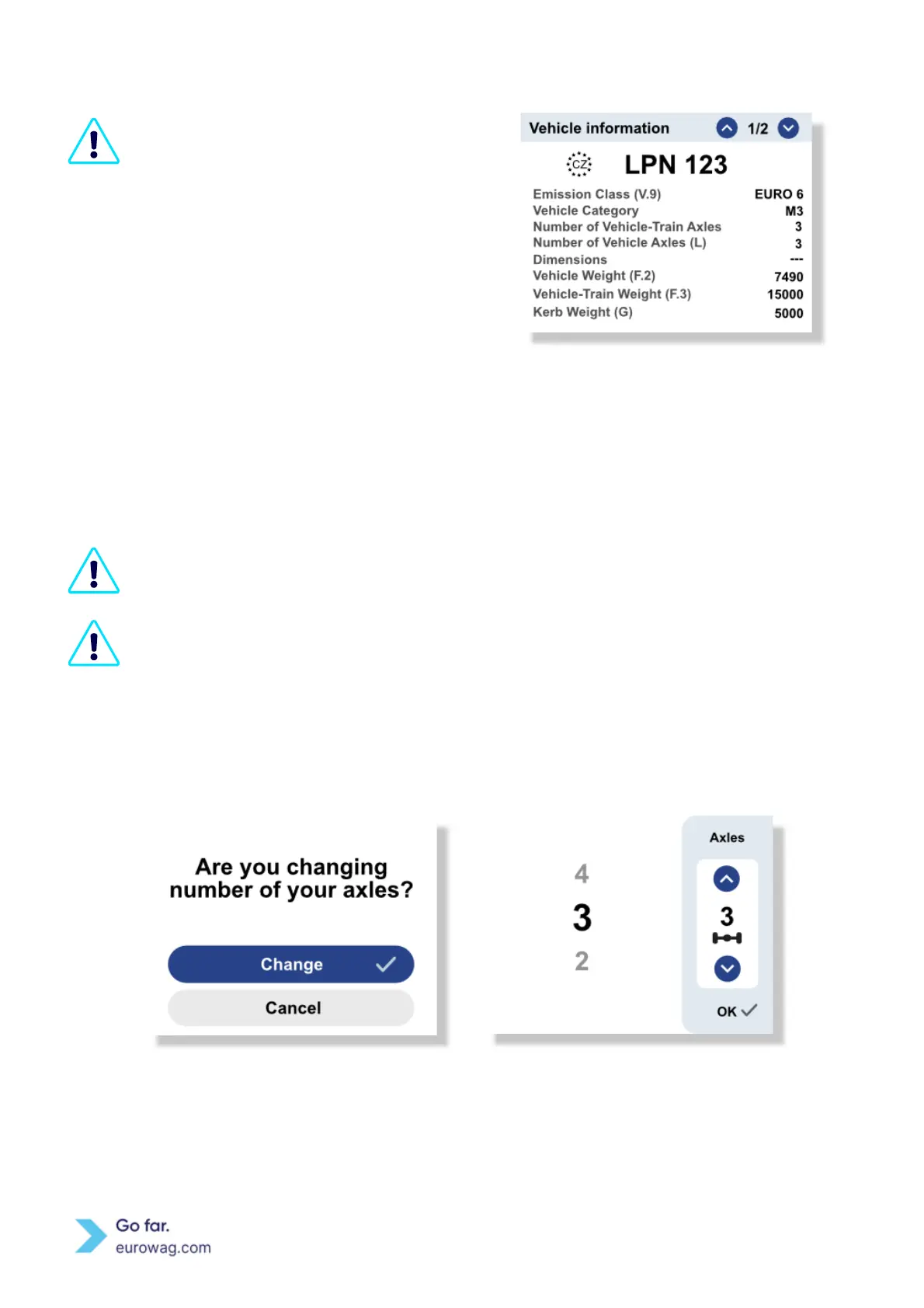
It is the user’s responsibility to check
the
displayed vehicle license plate number
(country code + LPN) and all vehicle data in
the Menu. Select the Vehicle and compare
the information displayed with that of the
actual vehicle. If the data is not correct then
contact Eurowag Customer Care and do not
use the EW OBU.
Screen displaying Vehicle information
5. Setting the number of axles
You are obliged to set up the correct number of axles according to the actual number of axles
on the vehicle, including the trailer, when entering a toll domain.
Before starting a drive, the driver must verify the conformity of EW OBU and vehicle. The
driver must always check and/or update the number of axles on EW OBU after coupling or
uncoupling the trailer.
A. Press any of the arrow buttons, select the correct number and then confirm by pressing the ✓ button.
B. Use the arrows until you reach the correct number of axles (i.e. whole train = tractor+trailer) and save
the changes with the ✓ button.
Screen to change number of axles (A)
Screen to select number of axles (B)
C. The current number of axles can be seen on the right side of the EW OBU display (section Axles or Axles
and class).


 To Next Page