L30C-30A-UK-02-01 5 May 2009
5. OPERATION AND DISPLAY MENU
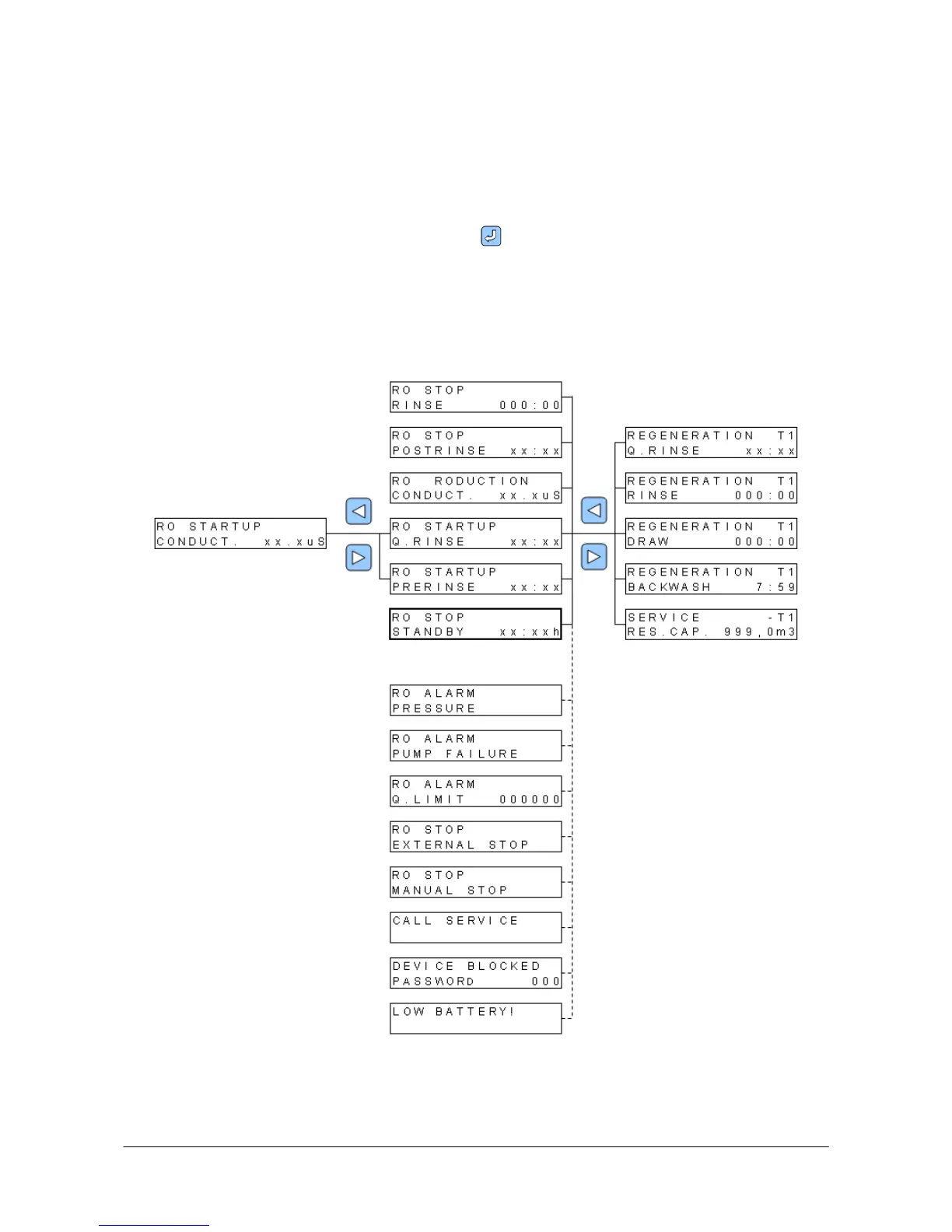
- display of operating status, alarms, and start/step of regeneration.
Operation menu is shown during ordinary plant operation. The menu comprises several
displays, see separate description.
Alarm: During plant operation various alarms can occur. Alarms are shown as text on the
display and as red LED alarm. Press ENTER to acknowledge an alarm.
Regeneration of the softening plant can be started manually by depressing key 0 and at the
same time pressing down key 1 for approximately two seconds.
It is also possible to step through the phases by depressing key 0 and pressing down key 2 for
approximately two seconds.
If the RO plant is in start-up it is also possible to step through the start phases by depressing
key 0 and pressing down key 5 for approximately two seconds.


 To Next Page