L30C-30A-UK-02-01 8 May 2009
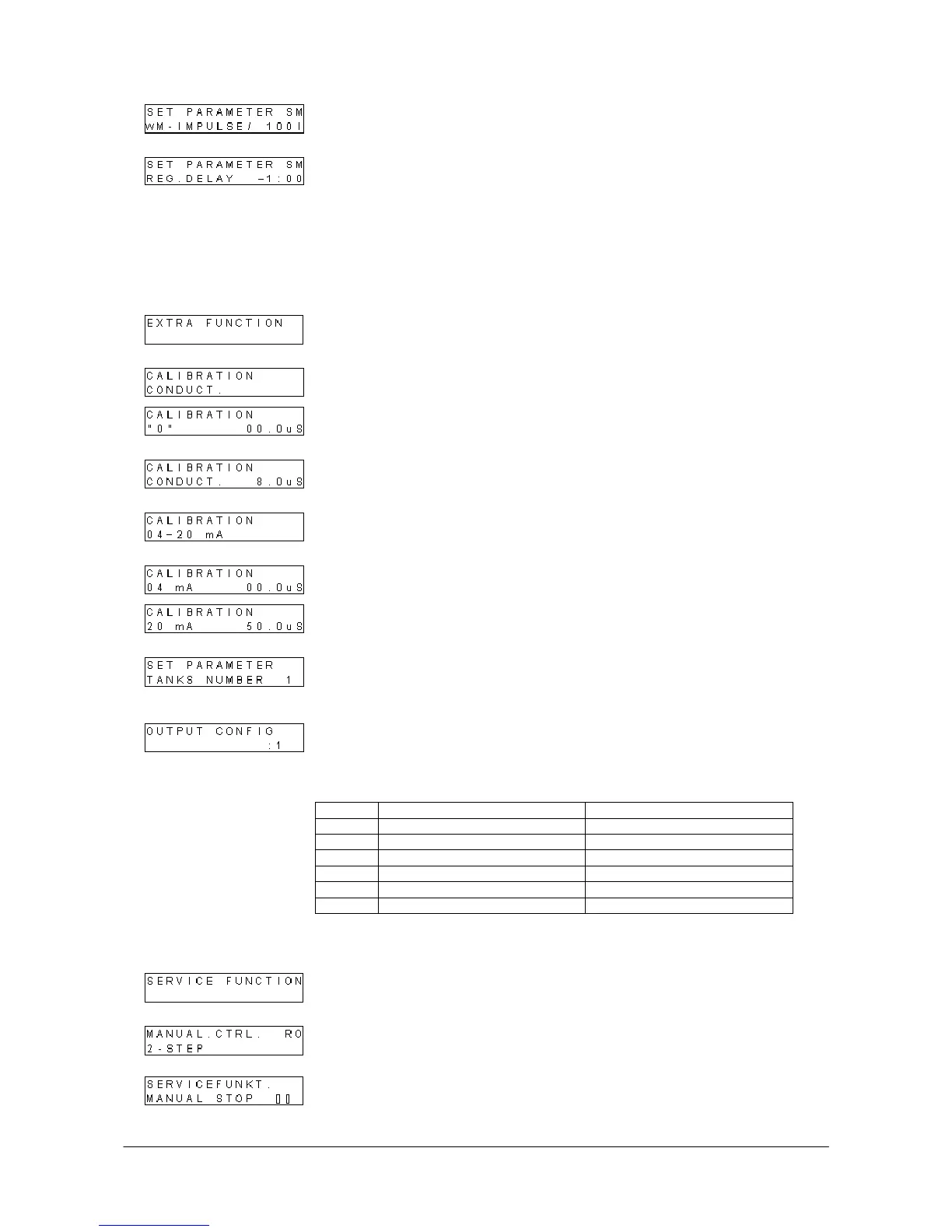
Softening, water meter: Set water meter type of the plant. Select 10, 100, or 1000
litres/pulse.
Softening, regeneration delay: Set time for delayed performance of regeneration,
i.e. after the preset volume has been reached. If a time is entered, regeneration will
be carried out the first time the entered time is reached after the entered volume has
been obtained.
Example: The time 16.00 has been entered and the volume is reached at 17.00. The
plant does not perform regeneration until the next day at 16.00. This function is only
possible with one-tank plants. If the time -1.00 is selected, the function is inactive.
6.4 Special functions
Calibration of displayed conductivity: Access to two-point calibration of displayed
conductivity. Only calibration of the displayed conductivity is possible.
"0" point: Demount the conductivity cell or insert it in a solution with a conductivity of
"0". Use the arrow keys to reach the value "0" and confirm with ENTER.
Actual point: Insert the cell in a solution of registered conductivity and adjust the
indication using the arrow keys until it corresponds to the solution. Confirm with
ENTER.
Calibration of analog output: Access to two-point calibration of indicating range for
the analog outlet. Only calibration of the analog output signal is possible.
4 mA point: Set the desired value applicable to 4 mA on output. Possible setting
from -9.9 to +25 µS/cm.
20 mA point: Set the desired value applicable to 20 mA on output. Possible setting
from 25 to 75 µS/cm.
Number of tanks in softening plant: Set the number of tanks on the softening
plant. Possible setting: 1 or 2. If one tank is selected, the RO plant stops during
regeneration of the softening plant.
Output configuration: Select function for outputs O10 (45+46) and O11 (47+48)
O10 dosing: Output active during RO preliminary rinse, quality rinse, and production.
Function can be selected as repetition of water meter pulses or as a constant.
O11 message: Select either RO production, RO in operation = inlet valve open, or
SM in regeneration.
Config. O10 dosing O11 message
1 water meter pulses RO production
2 water meter pulses RO operation
3 water meter pulses SM regeneration
4 Constant RO production
5 Constant RO operation
6 Constant SM regeneration
6.5 Service functions
RO, manual step: It is possible to step to the next phase by pressing key 2. It is
possible to step from pre-rinse to quality rinse and from post-rinse to RO stop.
RO, manual stop: It is possible to stop the RO plant if the plant is in automatic
operation. Select manual stop and the plant stops and operation will be blocked until
the function is disabled. Display shows "Manual stop".


 To Next Page
 Loading...