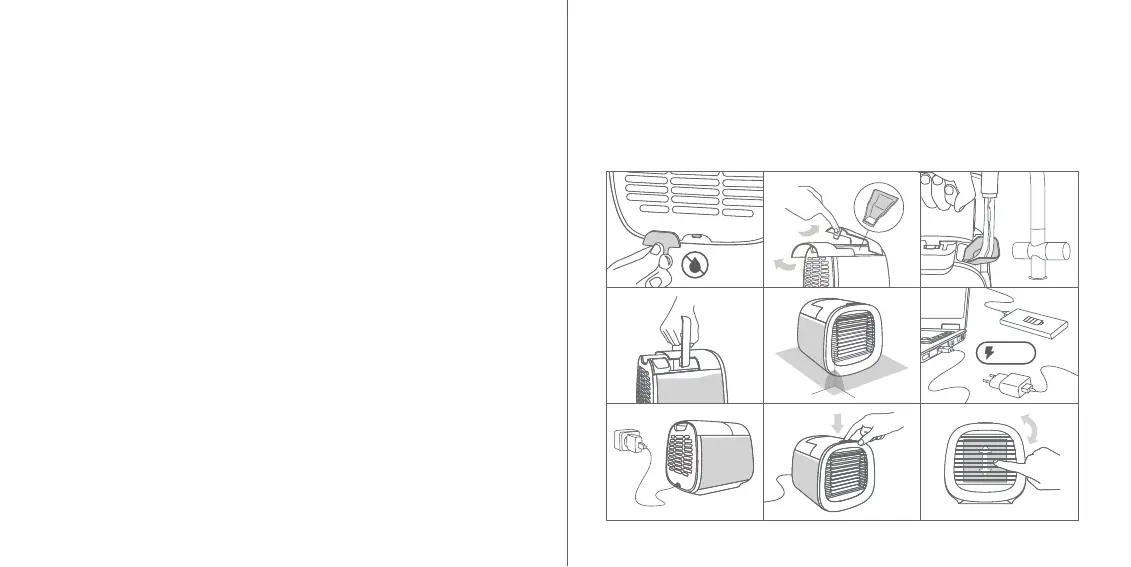
FILLING WITH WATER
1. Disconnect the cord, protect the USB-port with the silicone plug.
2. Slide the handle backward and lift it up. The water reservoir
opening is located under the handle. Push down the locker
and open the upper cover. You will find a funnel inside.
3. Fill the reservoir with pure water (filtered water is strongly re-
commended). Use the funnel for safer filling.
4. In order to avoid leakage, hold the device horizontally, by the
handle and move it slowly.
5. Place the device on the flat horizontal surface, put the handle
down, and slide it back to its original position.
OPERATING
6. Use a laptop or PC/power bank/adaptor plugged into a socket
as a power source. 2A 5V is a minimum requirement.
7. Use the power cord to connect the device to the power source.
You will see the three LED lights blinking one by one.
8. Push the control button on top of the device to start the fan
and adjust the airflow speed.
1. 2.
4.
7.
6.5.
8. 9.
TO START THE DEVICE
FOLLOW THE STEPS
3.
7 8
• Short press: turn the device on/off, adjust the airflow speed.
• LED lights: left - 1st speed, middle - 2nd speed, right - 3rd
speed. All the LED lights on – extra speed.
• Long pressing (pressing and holding) at any time: lighting on/off.
9. Move the front grills to adjust the airflow direction.
90°
90°
2A 5V


 To Next Page