13 14
MENU ITEMS AND MODES
NIGHT MODE
In the night mode, LED-lighting turns off and the display
dims. To enable: press OK, the device will automatically
go into night mode. To disable: press the OK button.
SLEEP MODE
You can set your evaSMART to turn off the fan after a
specific period of time. Select the item, press the Up/
Down buttons to change the values. Confirm your choice
by pressing OK. To disable it set the value to 0.
WI-FI SETTINGS
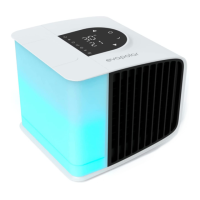
A built-in Wi-Fi module allows you to control your eva-
SMART remotely. To pair up your phone with evaSMART,
you will need to first install the Evapolar application on
your smartphone. After that, you will need to register a
new user account and choose “evaSMART Model 3” when
prompted. Finally, follow the animated instruction on your
phone screen to сonnect your phone to evaSMART. You
can also turn Wi-Fi on/off. Select the item from the list (the
selected item will blink), confirm your choice by pressing
OK. To exit the settings, press the Power button.
BRIGHTNESS SETTINGS
Select the item, use the Up/Down buttons to change the
values between 1% and 100%. To decrease or increase
the brightness quickly, press and hold the Up/Down but-
tons; to turn off the water reservoir lighting, set the bright-
ness to 0%. Confirm your choice by pressing OK.
LED LIGHTENING COLOR
You can choose your preferred lighting color for the water
reservoir and adjust its hue. Select the item, press and hold
the Up/Down buttons to go through the colors quickly.
Confirm your choice by pressing OK.
COLOR PLAYLISTS MODE
In this mode, the water reservoir lighting gradually changes
colors. Select the item, press and hold the Up/Down but-
tons to go through the available color playlists (each has
its unique number). Confirm your choice by pressing OK.
Download Evapolar app here


 To Next Page