3
user manual
EN
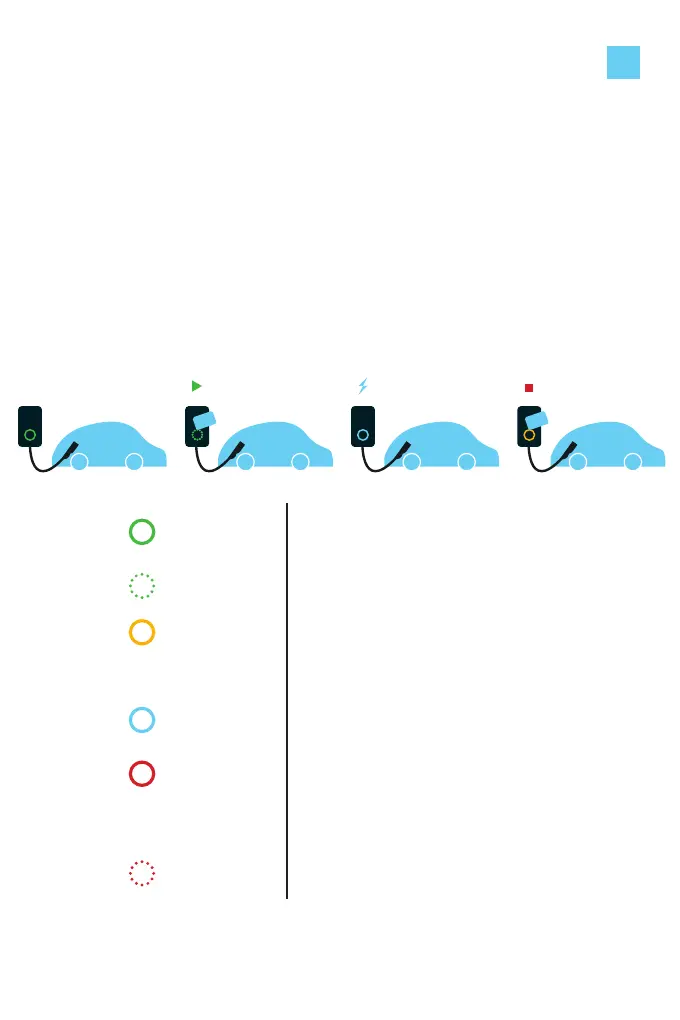
Start charging
1. Plug the charging cable into your car.
2. Hold your charge card (RFID Card) in front of the card reader.
3. The charging station reacts with a beep.
This means that your card is being validated.
4. The charging station’s LED turns blue when it starts charging.
Stop charging
1. Hold your charge card (RFID Card) in front of the card reader.
2. The charging station’s LED turns green when it stops charging.
3. If applicable, unplug the charging cable from your car.
LED green
or off
The charging station is ready for use
LED green
ashing
Your charge card is being veried.
LED yellow The charging station is awaiting
communication from the car or the
car is fully charged.
LED blue Charging in progress
LED red The charging station is experiencing
an error. Contact our Support Desk
LED red
ashing
Your charge card is unauthorized to
charge at this scharging station



 To Next Page