UltraTap QRG for Firmware v1.0+| Eventide Part #141346 Rev A. Eventide is a registered trademark of Eventide Inc. © 2021 Eventide Inc.
Restore Factory Settings: Boot pressing ACTIVE Footswitch & ACTIVE Button
Software Update: Boot pressing TAP Button & TAP Footswitch
Device Manager Software
eventideaudio.com/edm
Instructional Videos
eventideaudio.com/UltraTap-pedal
Technical Support
eventideaudio.com/support
Follow us on Social
LED OFF Tap OFF
STATUS FUNCTION
Press TAP Footswitch to increment presets
TAP Footswitch Functionality
Press & Hold the TAP Footswitch to toggle between Tap mode and Preset Select mode.
Press the TAP Button/LED to toggle between Tap Time and Tap Tempo as follows:
LED ON
LED Blinks
at BPM
Tap Time
Tap Tempo
Tapping sets Length in seconds. Chop LFO Speed is continuous in Hz
Tapping sets tempo in BPM. Length, Predelay & Chop LFO Speed set
by Spd/Rise/Rel are all quantized to note durations.
EFFECT
Note: A single tap
will always reset
the LFO phase
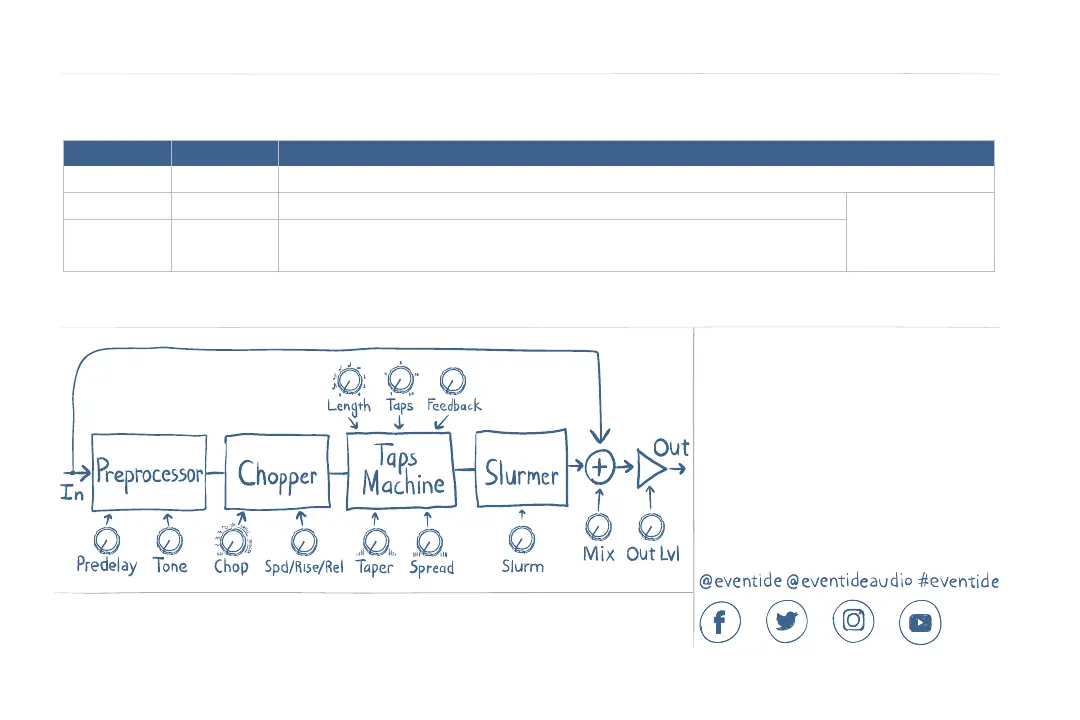
UltraTap Signal Flow



 To Previous Page