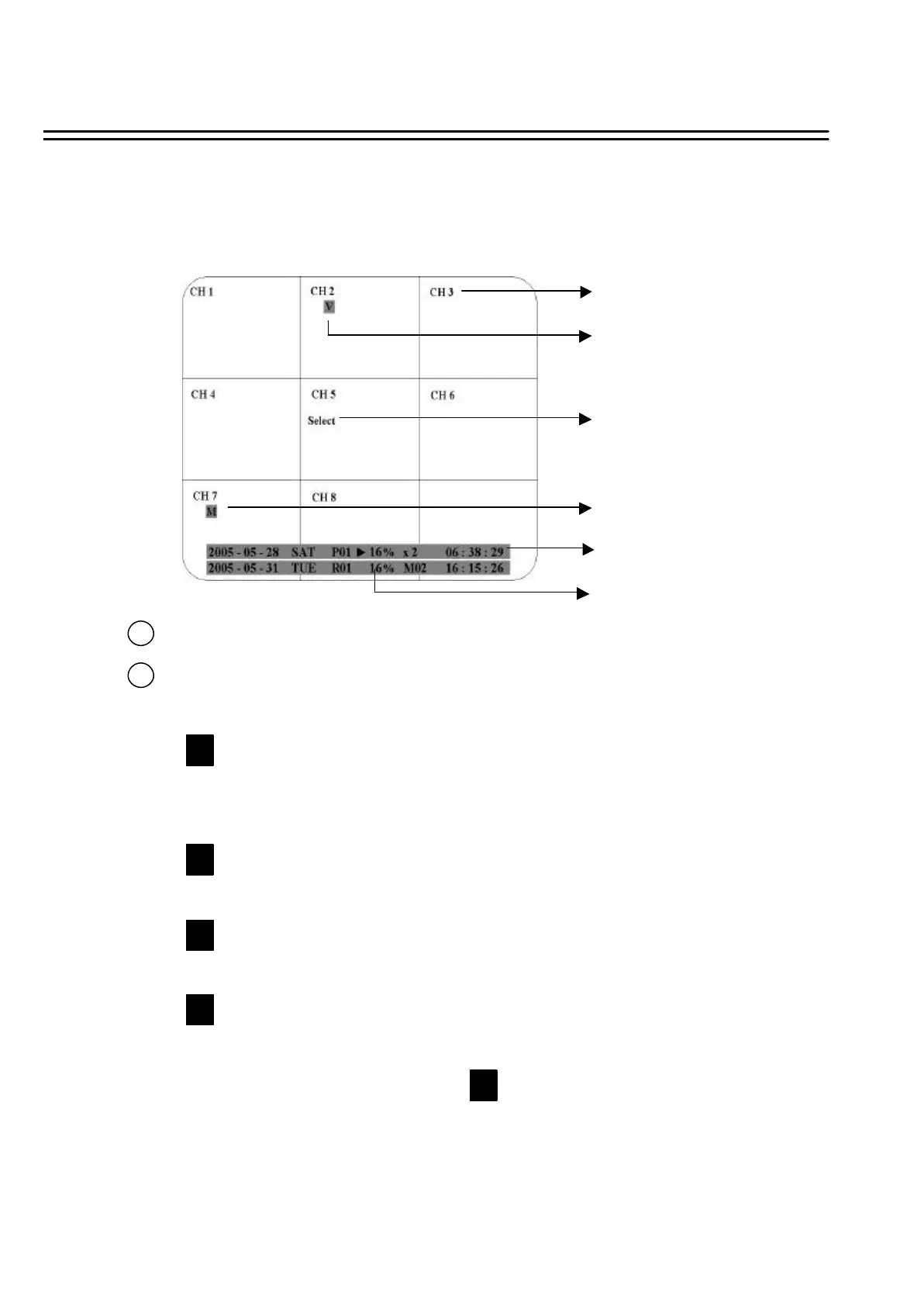
1.5 MONITOR DISPLAY
1. Channel tag
2. Event sign
3. Select sign
2. Event sign
4. Play status bar
5. Record status bar
2
Channel tag: A channel tag indicates the channel name of the screen.
Event sign: Event signals which are small icons with a capital letter and red background show the
events on each screen. There are 4 different signals which are
: Alarm event. The alarm place where the camera locates. In order to show the
camera video to a corresponding alarm, setting a FOCUS CAMERA in ALARM
SETUP MENUis necessary.
: Motion event. Motion event only shows up when the camera’s MOTION is enabled
in MOTION SETUP MENU, and the camera detects a motion.
: Video loss event. Video loss event only shows when the camera’s VLOSS is
enabled in VLOSS SETUP MENU, and the camera signal is lost.
: Sequence sign. Sequence sign shows up when the display is in the sequence mode.
The sequence display is located on display with a “*” sign in 4, 7, Full screen and PIP
(picture in picture) display mode. The sign will replace “*”sign in the
display when sequence occurs.
M
A
V
S
S
The status information of the cameras or machine will show up, and be located at different places on the
screen.
1
17















 To Next Page