10
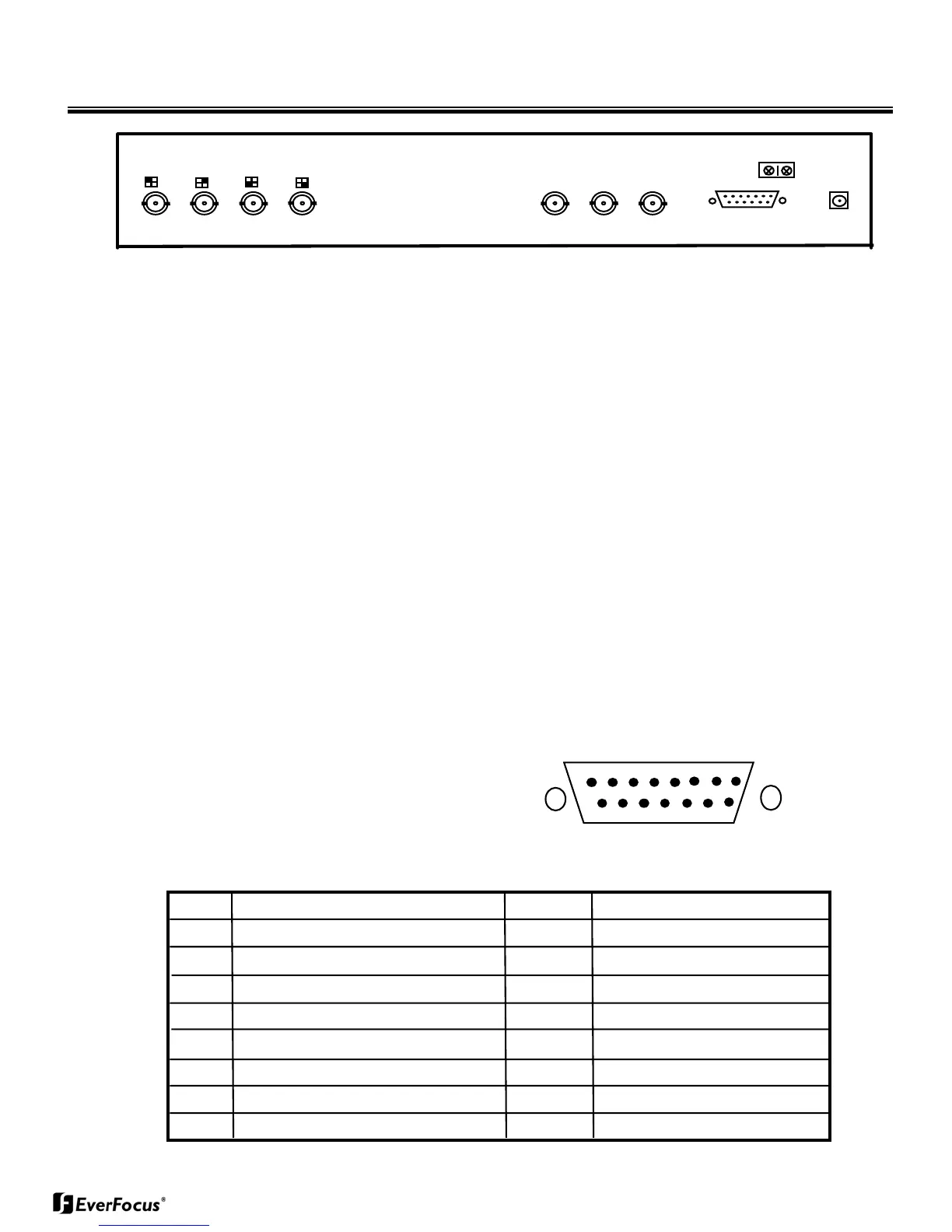
Chapter II Back Panel Connection
ALARM I/O
DC12V
AC24V
VIDEO INPUT
IN OUT OUT
VCR
MONITOR
1. BNC Connectors
1.1 MONITOR
Connect this output port to the main monitor.
1.2 VCR OUT
Connect this output port to the VIDEO IN of VCR. The quad video output of
live video is obtained from this connector.
1.3 VCR IN
Connect this input port to the VIDEO OUT of VCR.
1.4 VIDEO INPUT
Connect camera video out to this connector by a 75 ohm coaxial cable.
2. Alarm Connectors (DB-15)
1
8
9
15
PIN # NAME PIN # NAME
1 Alarm Out Common contact 9 Alarm Out Normally Open
2 Alarm Out Normally Closed 10 TXD *
3 Alarm Reset 11 RXD *
4 GROUND
5 ALARM IN 4
6 ALARM IN 3
7 ALARM IN 2
8 ALARM IN 1


 To Next Page