14
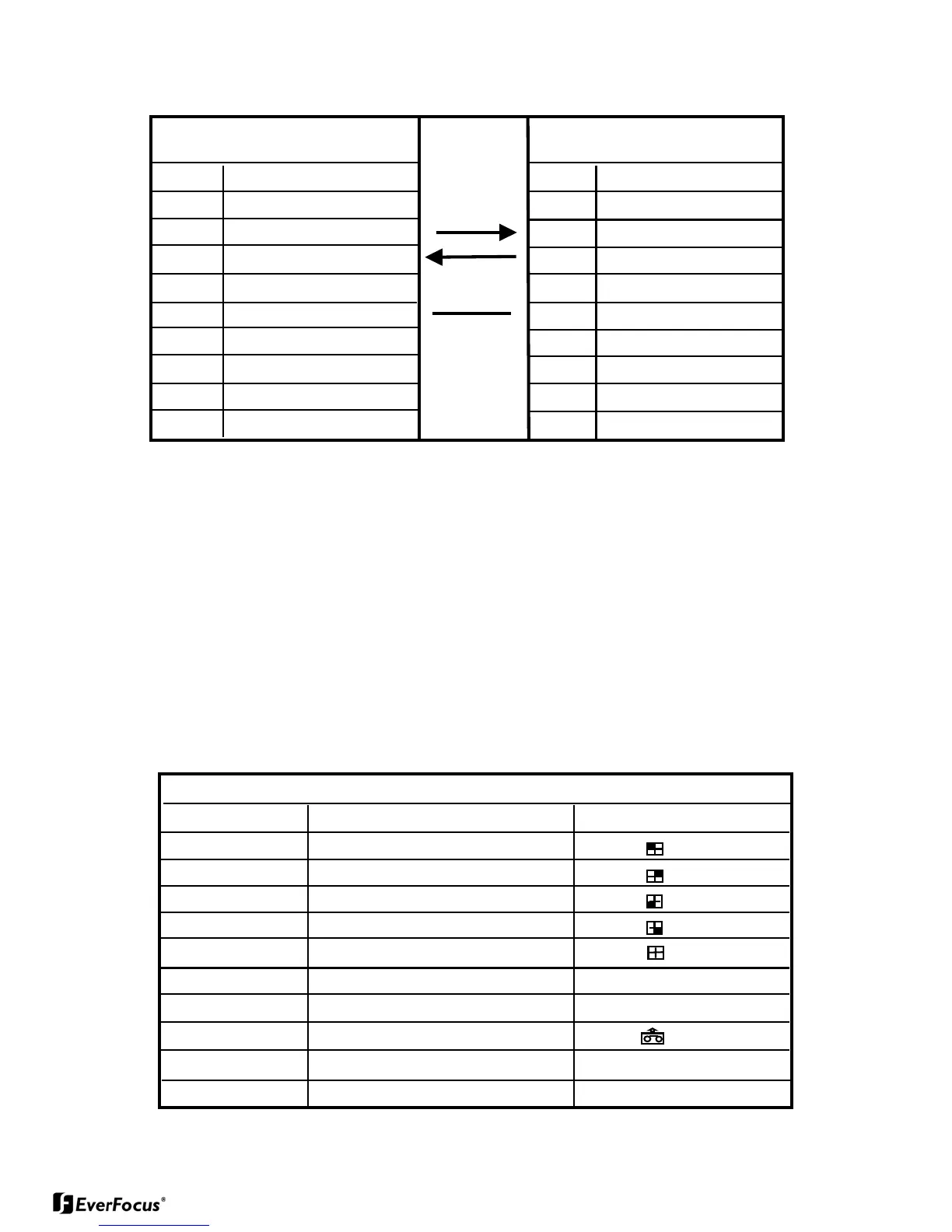
3.1. The pin assignment of the 9 pin D-SUB connector
PIN # NAME PIN # NAME
1 NOT CONNECTED 1 NOT CONNECTED
2 TXD 2 RXD
3 RXD 3 TXD
4 NOT CONNECTED 4 DTR
5 GROUND 5 GROUND
6 NOT CONNECTED 6 DSR
7 NOT CONNECTED 7 RTS
8 NOT CONNECTED 8 CTS
9 NOT CONNECTED 9 NOT CONNECTED
EverPlex 4CQ
HOST
3.2. Transmission Setting
The transmission setting in the EverPlex 4CQ is 9600 baud rate, 1 start bit, 1
stop bit and no parity.
3.3. Remote control protocol
A computer or a terminal can be used to control the EverPlex 4CQ by sending two-
character ASCII command through RS232 connector. These ASCII commands are
started with 'K' or 'k'. There are 9 ASCII commands mapped to the 9 keypads in the front
anel and 1 additional commands to reset the EverPlex 4CQ to the QUAD display state.
These 10 ASCII commands are show as below:
EverPlex 4CQ Remote Control Command Table
ASCII CODE FUNCTION Keypad in front panel
K1 Full Screen 1
K2 Full Screen 2
K3 Full Screen 3
K4 Full Screen 4
K5 Quad Display
K6 Freeze
Freeze
K7 Sequential Switching Seq
K8 VCR Play Back
K9 SET
Set
K0 Reset the Processor to Quad display None


 To Next Page